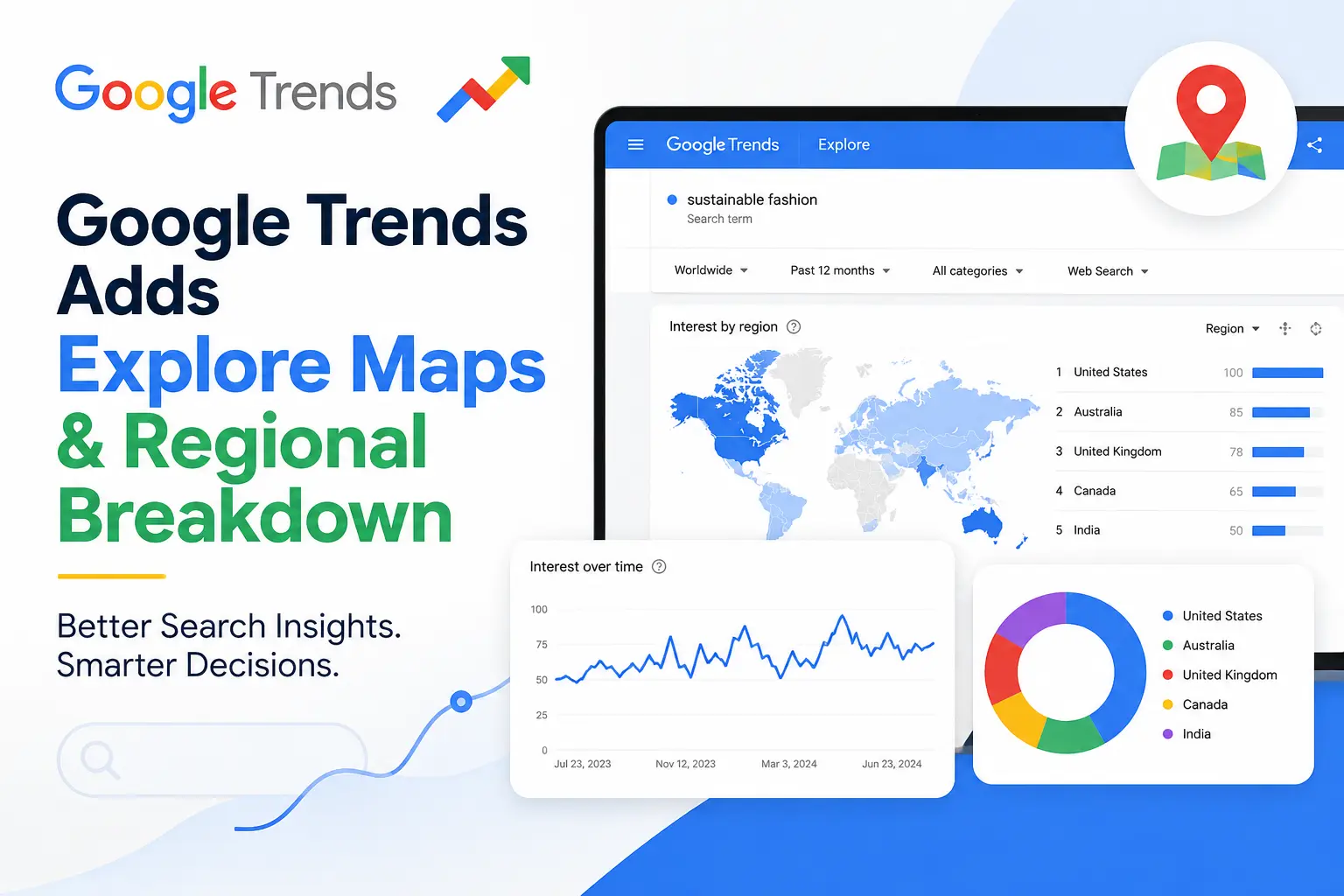
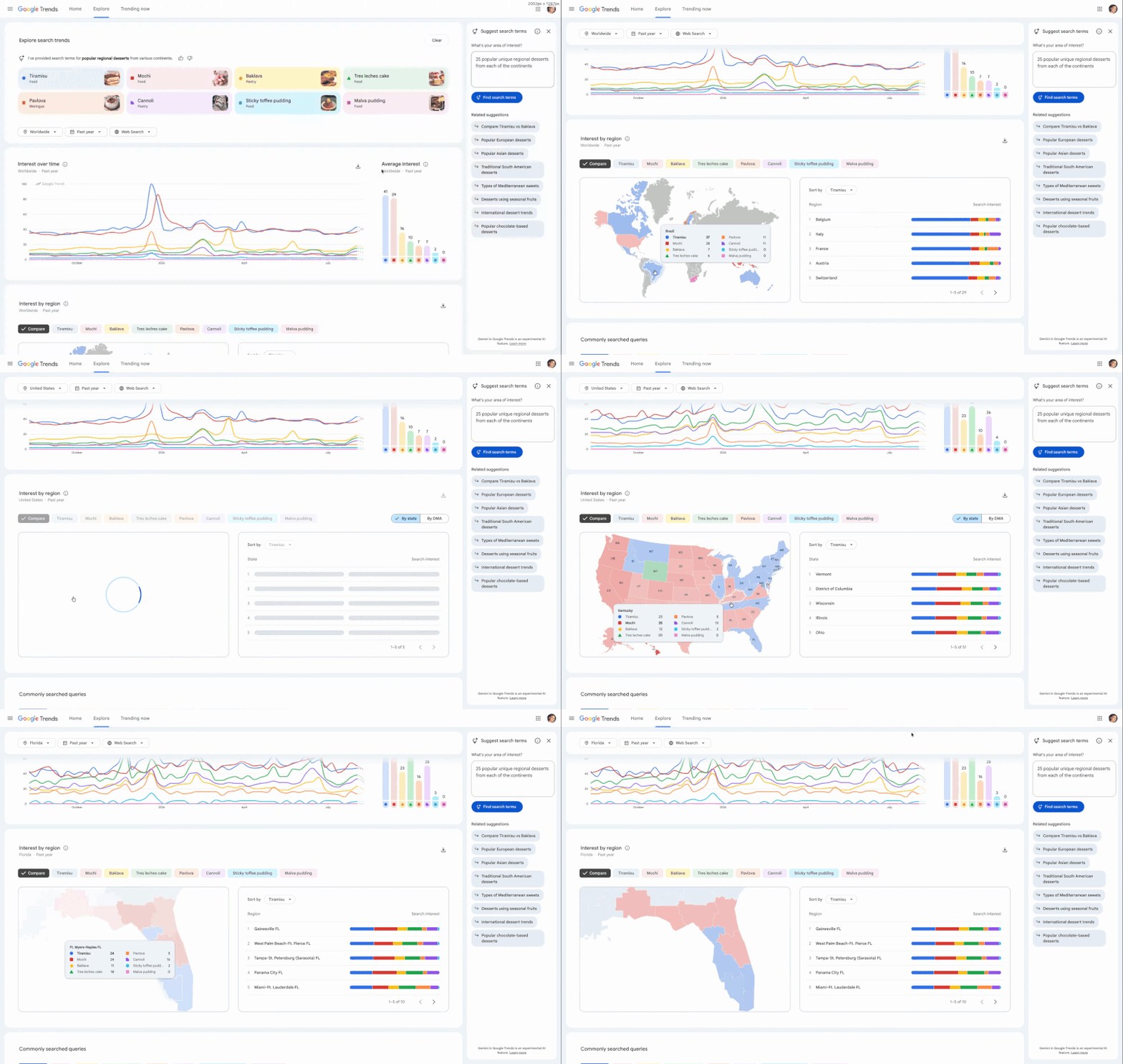
Google Trends has received a useful update that makes regional search data much easier to explore. Google has added two new features called Explore Maps and Regional Breakdown. The new features give users a clearer visual picture of where search interest is coming from.
Google announced the update on August 19, 2026. The company said the new interactive maps were designed to make data storytelling clearer and help users quickly spot regional trends.
Google Trends has provided regional search data for a long time, but the new maps make that information more visual and easier to understand. Users can search for a topic, keyword, or product and then explore its popularity across different regions. The map makes it much easier to notice areas where interest is particularly strong.
This can be especially helpful when a topic is popular in one location but receives less attention elsewhere. Instead of going through a long list of numbers, users can get a quick visual overview. Google says the goal is to help users “instantly spot regional trends” and capture useful visual insights for their audiences.
Regional Breakdown Adds More Detail
The Regional Breakdown feature gives users another way to understand search interest by location. It is important to remember that Google Trends measures relative search interest, rather than showing the exact number of searches.
For example, a region with a high Trends score does not necessarily have more total searches than a larger region. The score shows how popular a search term is compared with other searches in that location.
The new interface should make these regional patterns easier to explore without requiring users to spend as much time studying the data.
Why This Matters for SEO
The update could be particularly useful for SEO professionals and digital marketers.
When researching a keyword, it is useful to know not only how popular it is but also where people are searching for it. Regional data can help marketers understand which markets are showing stronger interest.
For example, a business selling a product across several regions may discover that searches are much higher in certain areas. That insight could help the company focus its advertising, content, or local SEO efforts.
Marketers can also use the information when creating location-specific landing pages or planning campaigns for different markets.
A Useful Tool for Content Creators
Content creators can also get more value from Google Trends with the new features. Imagine that a creator discovers a topic that is suddenly gaining search interest. The next question might be where that interest is coming from.
The new maps can help answer that question.
A travel publisher, for example, could discover that searches for a particular destination are especially strong in certain regions. That could help the publisher decide which audiences to target with new articles, videos, or guides.
The same approach can work for news publishers, bloggers, YouTubers, and businesses looking for new content ideas.
Making Search Data Easier to Understand
One of the biggest advantages of the update is the visual presentation. Search data can be difficult to explain when it is presented only through tables and numbers. Interactive maps can make those patterns much easier to recognize.
This could be useful when marketers are preparing reports or presenting research to clients. A visual map can show regional differences quickly without requiring the audience to study a large amount of data. It also makes Google Trends more useful for people who want to turn search data into a simple story.
Google Trends Continues to Evolve
Google Trends has grown into a useful research platform for marketers, publishers, and businesses. Users can compare search terms, track changes in interest, explore seasonal trends, and research topics across different locations.
Google also offers Trending Now, which focuses on searches that are currently gaining attention across countries and regions. The new maps add another layer to that experience by putting more focus on the geographic side of search behavior.
The New Features May Still Be Rolling Out
The updated features may not be available to everyone yet. Google often rolls out changes gradually, so some users may see the new maps while others may still have the older interface. If the features are not showing up for you, it may simply be a matter of waiting for the rollout to reach your account or region. The original report also noted that the new experience might not yet be fully live for all users.
What Marketers Can Learn From the Update
The new features could be valuable for both local and international marketing. Businesses can use regional search interest to find markets where people are already showing interest in a particular topic or product. This information can then be combined with other research when planning campaigns or entering new markets.
Of course, Google Trends should not be treated as a complete market research tool. Search interest alone does not tell you everything about demand, sales, or customer behavior. Still, it can provide a useful early signal and help businesses decide where to look more closely.
Final Thoughts
Google’s new Explore Maps and Regional Breakdown features are a welcome improvement to Google Trends. The update does not completely change the platform, but it makes one of its most useful data points easier to explore.
The biggest benefit is that users can now get a clearer picture of where search interest is coming from. For SEO professionals, marketers, publishers, and content creators, that extra context can make search data much more useful.
The rollout is still underway, so the new features may not appear for everyone immediately. If you use Google Trends regularly, it is worth checking the Explore section and seeing what the new regional maps can show you.
Picture this. A driver in Houston feels a grinding sensation every time she brakes. She texts her coworker and asks if he knows a good mechanic nearby. He says, “Yes, try Riverside Auto on Westheimer. They are great.”
She takes out her phone. She does not call Riverside Auto.
She Googles it.
What she finds in the next 60 seconds will decide whether she books an appointment or quietly opens a second tab and picks someone else entirely. This is the moment where word-of-mouth ends and digital reality begins. For most independent auto repair shops, that moment is where they win or lose the customer.
Referrals are not dead. They are still one of the most powerful ways a new customer discovers your shop. But the referral no longer closes the deal on its own. Today, the recommendation starts the journey. Your online presence finishes it.
This guide explains exactly how that customer journey has changed, what drivers look for before they call, and what every auto repair shop owner needs to do to stay visible, trusted, and chosen in 2026.
Word-of-Mouth Still Works, But the Customer Journey Has Changed
Before the internet, a referral was enough. A customer heard your shop’s name from a neighbor, wrote down the number, and called. That was the entire process from discovery to decision.
That journey no longer exists.
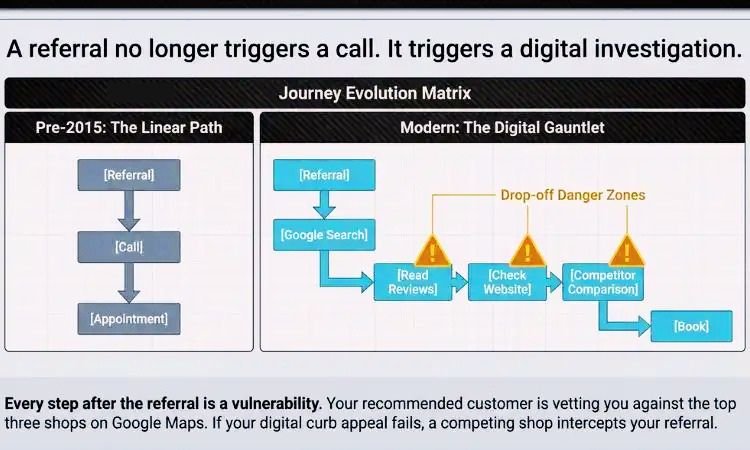
Today, the same referral triggers a digital investigation. The customer searches your shop name, reads your reviews, looks at your photos, visits your website, compares you against the top three shops appearing in Google Maps, and makes a decision. Sometimes that process takes two minutes. Sometimes it takes twenty. But it almost always happens before the customer ever picks up the phone.
Here is how the two journeys compare:
The old customer journey was simple. Referral, then call, then appointment.
The modern customer journey looks completely different. Referral, then Google search, then Google Maps, then reviews, then website, then social media, then comparison with other shops, then call or book online.
Every step after the referral is a moment where a competing shop can steal that customer. And
Your Best Referral Might Be Searching for You Right Now on Google
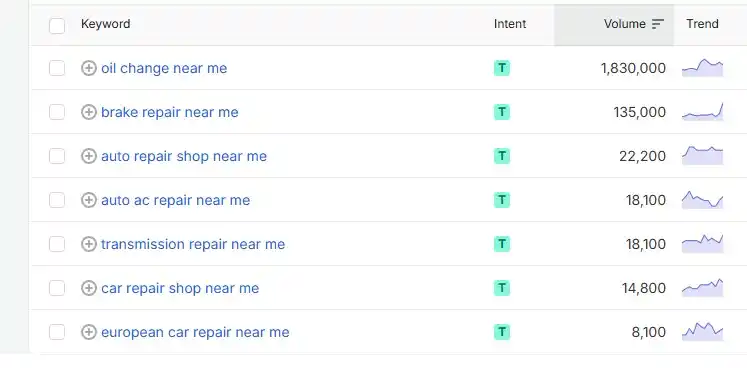
Here is a number that should change how you think about your marketing. Third-party keyword research datasets estimate that the search term “mechanic near me” receives approximately 752,500 searches per month across the United States. “Auto repair near me” generates around 340,100 monthly searches. “Auto repair shop” pulls another 74,000.
These are not people browsing for entertainment. These are drivers with a problem sitting in front of them right now. They are looking for a shop they can trust today.
Your current customers are not sending referrals to all of them. Nobody’s network reaches that many people. But your Google presence can.
If your shop is not ranking in the Google Map Pack for these searches, you are invisible to thousands of potential customers every single month in your own market. They are searching for exactly what you offer, right in your city, and choosing shops that show up while yours does not.
Word-of-mouth reaches the people who know someone who knows you. Search reaches everyone else. That second group is significantly larger than the first.
Here is another number worth understanding. Those keyword datasets show estimated cost-per-click values for these terms that reveal just how commercially valuable this search traffic really is. Advertisers pay around $5.90 per click for “auto repair near me” and around $6.31 per click for “brake repair.” Businesses only pay those amounts when they believe the person clicking is ready to spend money.
Search volume tells you how many people are looking. Cost per click tells you how valuable those people are. Together, they reveal a market your shop may be largely invisible to right now.
Customers Don’t Just Search for a Mechanic, They Vet Them
When a referred customer searches your shop name, they are not just confirming you exist. They are conducting a trust audit in real time. They are asking one question before they commit: does this shop look like somewhere I can trust with my vehicle?
Here is what they check in roughly this order.
They look at your star rating first. Then they check how many reviews you have. Then they read the most recent ones to see if anything worrying comes up. Then they look at your photos to see if the shop looks clean and professional. Then they click your website to check your services, your address, and whether you list your hours correctly. They also glance at whether the owner bothers responding to reviews at all.
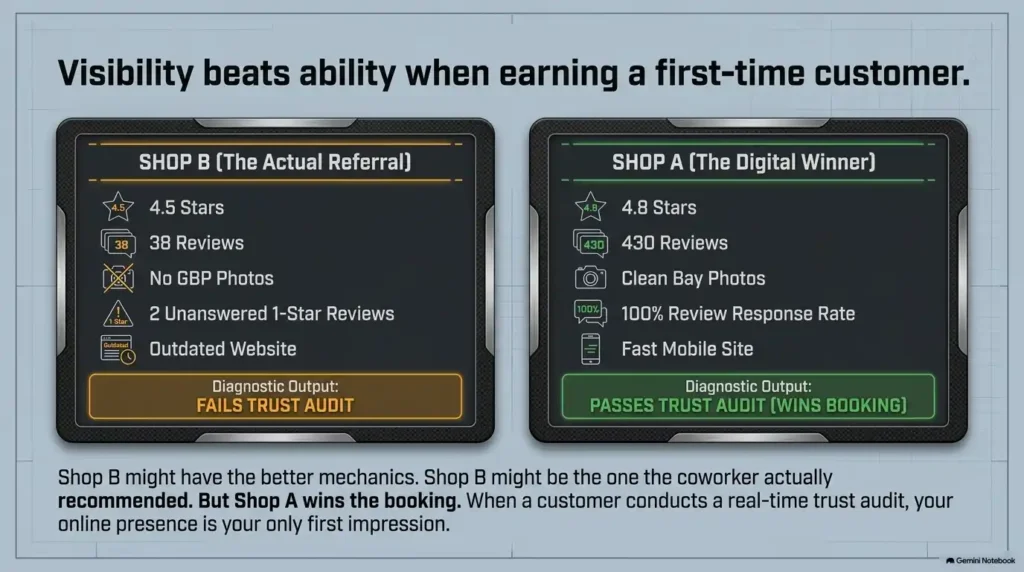
Now consider two shops. Shop A has a 4.8-star rating with 430 reviews. The photos show clean bays, friendly technicians, and real before and after repair images. The website is clear and loads fast on mobile. The owner responds to every review, including the negative ones, with a calm and professional reply.
Shop B has a 4.5-star rating with 38 reviews. The website looks outdated. The Google Business Profile has no photos. There are two unanswered one-star reviews sitting at the top of the listing. The hours listed do not match the hours on the website.
Shop B may do better mechanical work. It may have the more experienced team. It may be the shop the customer’s coworker actually recommended. But Shop A wins the booking more often than not, because it looks more trustworthy to someone who has never been there before.
Your online presence is your first impression. For most new customers, it is your only first impression.
Your Google Reviews Are the New Word-of-Mouth
Think about what a traditional word-of-mouth referral sounds like. “My brother takes his truck there. They fixed his transmission in a day and did not overcharge him.”
That recommendation reaches maybe one or two people. It happens once, in a private conversation, and then it disappears.
Now think about what a Google review looks like. “This shop diagnosed my check engine light in under an hour, called me with a clear explanation, and had my car ready the same afternoon. Fair pricing and the technician walked me through everything. I will never go anywhere else.”
That review sits on your Google Business Profile permanently. It is visible to every person who searches your shop name. It influences every local customer deciding between you and three other shops. It works for you 24 hours a day without you lifting a finger.
Reviews are word-of-mouth at scale. A single happy customer who leaves a review is still talking about your shop years after their visit. A customer who tells their neighbor but never leaves a review stops influencing anyone the moment that conversation ends.
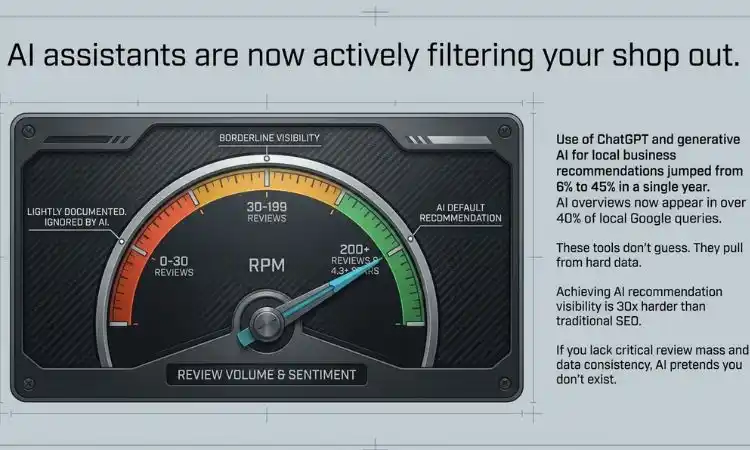
Google reviews are the threshold where AI tools begin treating a local business as well-established. Under 30 reviews, AI considers you lightly documented. Over 200 reviews with strong positive sentiment, you become a default recommendation.
This means your review count is not just a reputation metric anymore. It is a direct factor in whether AI tools recommend your shop when someone asks for help choosing a mechanic.
The shops winning the review game are not just doing better work than everyone else. They have a system. They ask every satisfied customer for a review within two hours of vehicle pickup. They make it effortless with a direct link sent by text. And they respond to every single review, positive or negative, within a day.
If your shop is generating 10 or fewer reviews per month right now, you are falling behind competitors who have made review collection part of their standard process.
Near-Me Searches Are Changing How People Find Auto Repair Shops
There is an important distinction between two types of people searching online right now.
The first person types “how often should I change my oil?” They are curious. They are researching. They are probably not booking an appointment today.
The second person types “auto repair near me.” They have a problem. They want it fixed. They are ready to call. That is a completely different level of intent, and it is worth understanding clearly.
Search intent tells you how close someone is to becoming a paying customer. Near-me searches come from people who have already decided they need service. They are only deciding which shop to call.
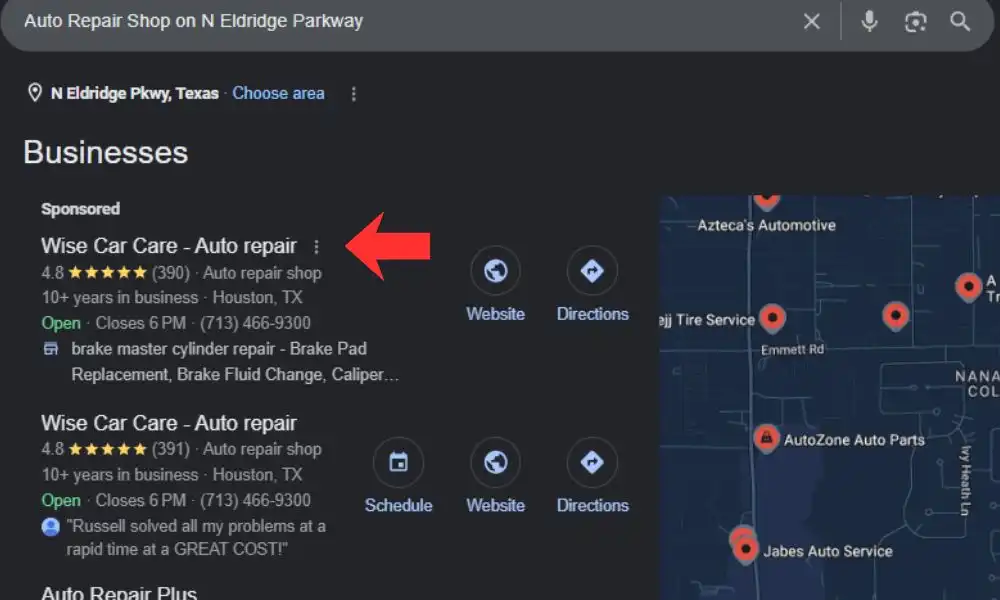
The auto repair shops ranking in the top three positions on Google Maps capture the majority of calls for any given local search. Independent shops that invest in their Google presence get the first visit, and in auto repair, the first visit turns into years of repeat business. If your shop is not in those top three positions for at least a handful of relevant local searches, the majority of near-me customers in your market are calling someone else. Not because your shop is worse. Because yours does not appear when they are looking.
Here is a simple but powerful way to think about the numbers. Imagine 1,000 drivers in your Houston neighborhood search for auto repair services in a given month. Of those 1,000, around 100 discover your shop through your Google listing. About 30 of those make contact. Roughly 15 book an appointment and become paying customers.
That is not a guaranteed funnel. It is an illustration of what local search visibility can look like when your online presence is working. Now imagine your shop is not ranking at all. That entire group of 1,000 local searchers never sees you. None of those 15 customers walk through your door. They walk through your competitor’s door instead.
Word-of-mouth did not reach those 1,000 people. Search could have.
The Biggest Mistake: Chasing Traffic Instead of Customers
Not all online visibility is created equal. Many shop owners hear the word SEO and assume the goal is to get as many website visitors as possible. That is not the right goal.
The goal is to get found by people who are ready to spend money on a repair right now.
This distinction matters enormously. Some search terms attract people who are months away from needing service. Others attract people who are sitting in a parking lot with a dead battery, trying to find someone who can help them within the hour.
Low-commercial-intent searches look like this. “How does a transmission work?” “Why is my car making a rattling noise?” “Car maintenance tips for beginners.” These are people researching, not booking.
High commercial intent searches look like this. “Transmission repair near me.” “Brake repair Houston.” “Auto repair shop near me.” “Car AC repair near me.” “Mechanic near me open today.” These are people ready to call.
A keyword with 500 monthly searches and strong buying intent can be worth far more to your shop than a keyword with 50,000 searches where most people are just curious. The shops that grow fastest through local SEO are the ones focusing on purchase-ready search terms in their specific market, not just broad traffic volume. Build your content and service pages around the searches that signal someone is ready to book. That is where your marketing investment delivers real, measurable return.
Word-of-Mouth Cannot Control What Customers Find About You
This is the part of the conversation that makes some shop owners uncomfortable. A referral can send a new customer to your door. But a referral cannot control what that customer finds when they look you up.
Your neighbor sends a new customer your way. That customer searches your shop name and finds a 3.9-star rating with two unanswered one-star reviews near the top. The shop photos show an outdated exterior taken years ago. The website loads slowly on mobile and lists phone numbers that no longer work. The hours on Google say you close at 5 PM, but your actual closing time is 6 PM. That referral did its job. It sent a potential customer your way. Your online presence did not do its job. It turned that customer away before they ever called.
Most independent auto repair shops list only “auto repair shop” as their Google Business Profile category, have no photos of the actual shop, and have a business description that could describe any mechanic in any city. Google has no reason to rank that listing above a competitor with a complete, detailed, and recently updated profile.
Every piece of information a potential customer can find about your shop online is either working for you or against you. Incorrect hours create frustration. Unanswered negative reviews signal indifference. No photos signal nothing about your quality or professionalism.
The good news is that every single one of these problems is fixable. And fixing them does not require a large budget. It requires attention and consistency.
AI Search Is Creating a New Layer of Visibility That Most Shops Are Missing
The way people find local businesses is changing in a new and significant way. It is no longer just Google Maps and Yelp. It is increasingly AI tools like ChatGPT, Google’s AI Mode, and other AI-powered search features that now actively recommend local businesses to people asking conversational questions.
Drivers are now asking things like “What is the best auto repair shop near me?” or “Who specializes in transmission repairs in Houston?” or “Can you recommend a trustworthy mechanic who works on Toyotas?” These questions used to go to a search engine. Now they increasingly go to an AI assistant.
Use of ChatGPT and other generative AI tools for local business recommendations rose from 6 percent to 45 percent in a single year, making it the third most popular source of business recommendations behind Google and Facebook.
That is a remarkable shift in a single year. And the AI tools recommending local businesses are not picking names at random. They are pulling from the same signals that local SEO has always depended on: review volume and quality, complete and consistent business information, active and authoritative online presence, and well-structured service pages.
Achieving AI local recommendation visibility is 30 times harder to accomplish than achieving traditional Google local search rankings. AI tools strongly favor businesses with high review ratings, averaging 4.3 stars for businesses recommended by ChatGPT.
This does not mean traditional local SEO no longer works. It means the bar has been raised. A shop that worked hard to rank on Google Maps two years ago now needs to ensure that same presence is built in a way that AI tools can understand, trust, and recommend.
Google AI Overviews appear in over 40% of queries related to local businesses. That means nearly half of all searches connected to your shop category may now surface an AI-generated summary before a customer ever reaches your website or Google listing.</cite>
Shops that have built a strong, accurate, and consistent digital presence across Google, Yelp, their website, and other directories are the ones AI tools recommend. Shops that have not built that foundation are invisible to a growing portion of the local search market.
What Auto Repair Shops Should Do Instead
Word-of-mouth and digital marketing are not competing strategies. They work together inside what you can call the Modern Auto Shop Visibility Stack.
Here is how the full stack works and what you should focus on at each level.
Level 1. Keep Delivering Exceptional Service
Every strategy in this guide starts here. Your work quality, your communication, and your honesty are what generate referrals and positive reviews in the first place. No amount of marketing fixes bad service. But great service with no marketing leaves enormous revenue on the table.
Level 2. Build a Complete and Active Google Business Profile
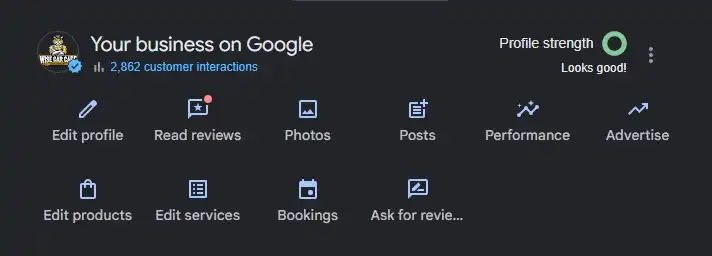
Your Google Business Profile is your most powerful free marketing tool. Claim it, complete every field, and keep it updated. List every service you offer as a separate service with its own description. Add real photos of your team, your bays, and your completed work. Post weekly updates about specials, hours changes, or new services. Respond to every review within 24 hours.
Level 3. Build a Systematic Review Generation Process
Ask every satisfied customer for a review within two hours of vehicle pickup. Send a text message with a direct link to your Google review page. Make it one tap to complete. Set a minimum goal of 10 new reviews per month, then increase it as your process matures.
Reply to every review. A thoughtful response to a negative review can actually build more trust than the negative review damages. Customers notice when a shop owner engages respectfully and takes feedback seriously.
Level 4. Invest in Local SEO and Dedicated Service Pages
Your website needs a separate page for every major service you offer. Not one giant “Services” page. Individual pages targeting searches like “brake repair Houston,” “transmission repair near Houston,” and “oil change Katy TX.” Each page should clearly explain the service, address common customer questions, and include a booking call to action.
Auto shops that invest in building out dedicated service pages often see call volume increase by 20 to 40 percent within the first few months as new pages begin driving targeted local search traffic.
Level 5. Build a Fast, Mobile-Friendly Website
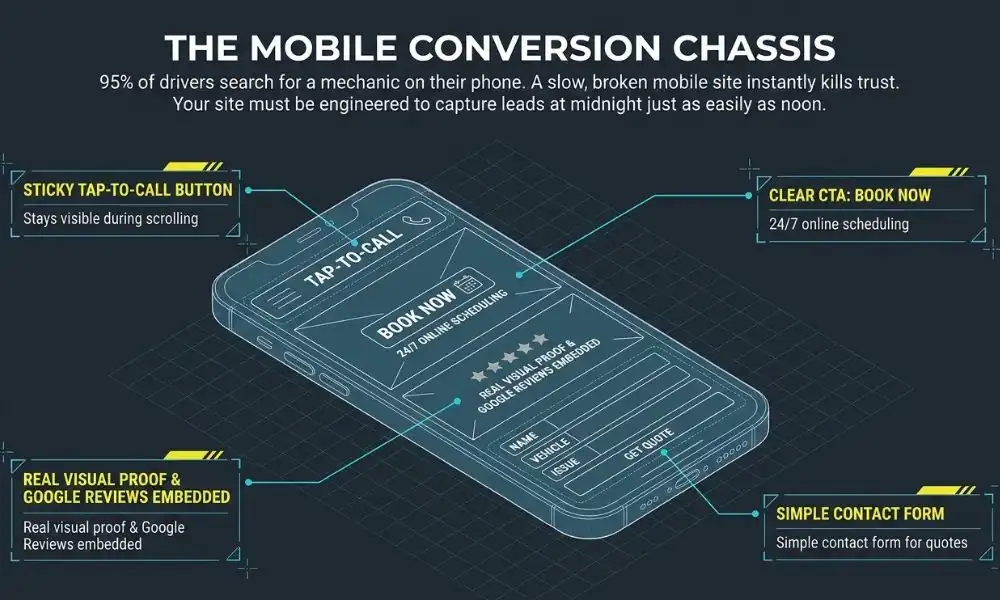
Most drivers searching for a mechanic are on their phone. If your website takes more than three seconds to load on mobile, most visitors leave before reading a single word. Your website needs a tap-to-call button on every page. It needs your address, hours, and services visible without scrolling. It needs an online booking option that works at midnight when your front desk is closed.
Level 6. Create Social Proof Through Visual Content
Post real photos and short videos on Instagram and Facebook regularly. Before and after shots of completed repairs build trust faster than any written description. Show your technicians. Show your clean shop. Show your happy customers. These posts reach local drivers who may never have heard of your shop any other way.
Level 7. Make Your Online Presence AI-Ready
Ensure your business name, address, and phone number are identical across your Google Business Profile, your website, Yelp, Bing Places, Apple Maps, and every other directory where you are listed. This consistency is one of the core signals both Google and AI tools use to verify your shop’s legitimacy and relevance.
Write your website content in clear, conversational language that answers real customer questions directly. AI tools pull from well-organized, trustworthy web content when generating local business recommendations.
Here is a simple way to understand the business case for everything covered in this guide.
Your shop currently generates 30 new customers per month through referrals. That is strong. But suppose 800 people in your Houston market search for auto repair services every month that you are perfectly positioned to serve. Your shop never appears in front of them because your Google presence is incomplete or your reviews are too few.
That means you are capturing 30 customers from a pool of 830 potential new customers. Word-of-mouth is reaching about 3.6 percent of your available market. A strong local SEO and review strategy can reach the other 96.4%
Even a modest improvement in search visibility, capturing an additional 15 new customers per month at a $300 average repair order, generates $4,500 in additional monthly revenue. That is $54,000 per year from customers who were already searching for exactly what you offer and simply could not find you.
This is not a complicated argument. It is just math.
Word-of-Mouth Isn’t Dead. It’s Just Digital Now.
Your customers are still talking about your shop. They are still telling friends, coworkers, and family members about the great experience they had. That has not changed.
What has changed is what happens next.
The friend they told Googles your shop. They read your reviews before they call. They look at your photos before they book. They compare your star rating against two other shops before they make a decision. And increasingly, they ask an AI assistant which shop in Houston they should choose.
Word-of-mouth gets you considered. Your online presence gets you chosen.
The shops filling their bays in 2026 are not only the shops with the best technicians. They are the shops that understood this shift early and built a digital presence that earns trust before a customer ever walks through the door.
Referrals are the starting line. Everything that happens online after the referral is the race.
Make sure your shop is set up to win it.
Ready to Turn Your Online Presence into Your Most Powerful Marketing Asset?
Your shop’s reputation is your most valuable asset. But that reputation only works for you if customers can find it, read it, and trust it before they call.
4P Wisdom is a Houston-based digital growth agency built specifically for auto repair shops. Our services cover every layer of the Modern Auto Shop Visibility Stack. We handle local SEO, Google Business Profile management, reputation management, Google Ads, website design, content marketing, and social media. Every strategy we build is custom to your shop, your market, and your revenue goals.
We do not guess at what works. We measure it. We track your rankings, your review growth, your call volume, and your new customer count every single month, so you always know exactly what is happening and why.
Google has updated its official crawl budget documentation with new guidance that could help large websites improve crawling efficiency. One of the biggest takeaways is Google’s recommendation to use the HTTP 304 Not Modified status codefor pages that haven’t changed since the last crawl. This simple server response can reduce unnecessary crawling, save server resources, and help Googlebot focus on discovering and indexing fresh content.
Although the updated documentation is primarily intended for enterprise websites with more than one million pages and medium-sized sites containing over 10,000 frequently updated pages, the recommendations provide valuable insights for anyone interested in technical SEO and website performance.
Google Explains How Crawl Capacity Is Shared
One of the most notable additions to Google’s documentationis a clarification about how its crawlers use a website’s crawl capacity.
Google explains that while different crawlers have different purposes and levels of demand, they all share the same crawl capacity limit for a website. In other words, Google’s various bots don’t have separate crawl budgets. Instead, they draw from the same pool of available resources.
For example, if Googlebot is crawling your web pages while Googlebot-Image is simultaneously scanning your images, both crawlers are using the same crawl capacity. If one crawler becomes highly active, it can reduce the resources available for the others.
This is an important clarification because many website owners assume each Google crawler operates independently. Google’s latest guidance makes it clear that heavy crawling by one bot can affect how efficiently other Google crawlers access your site.
Why Crawl Budget Matters
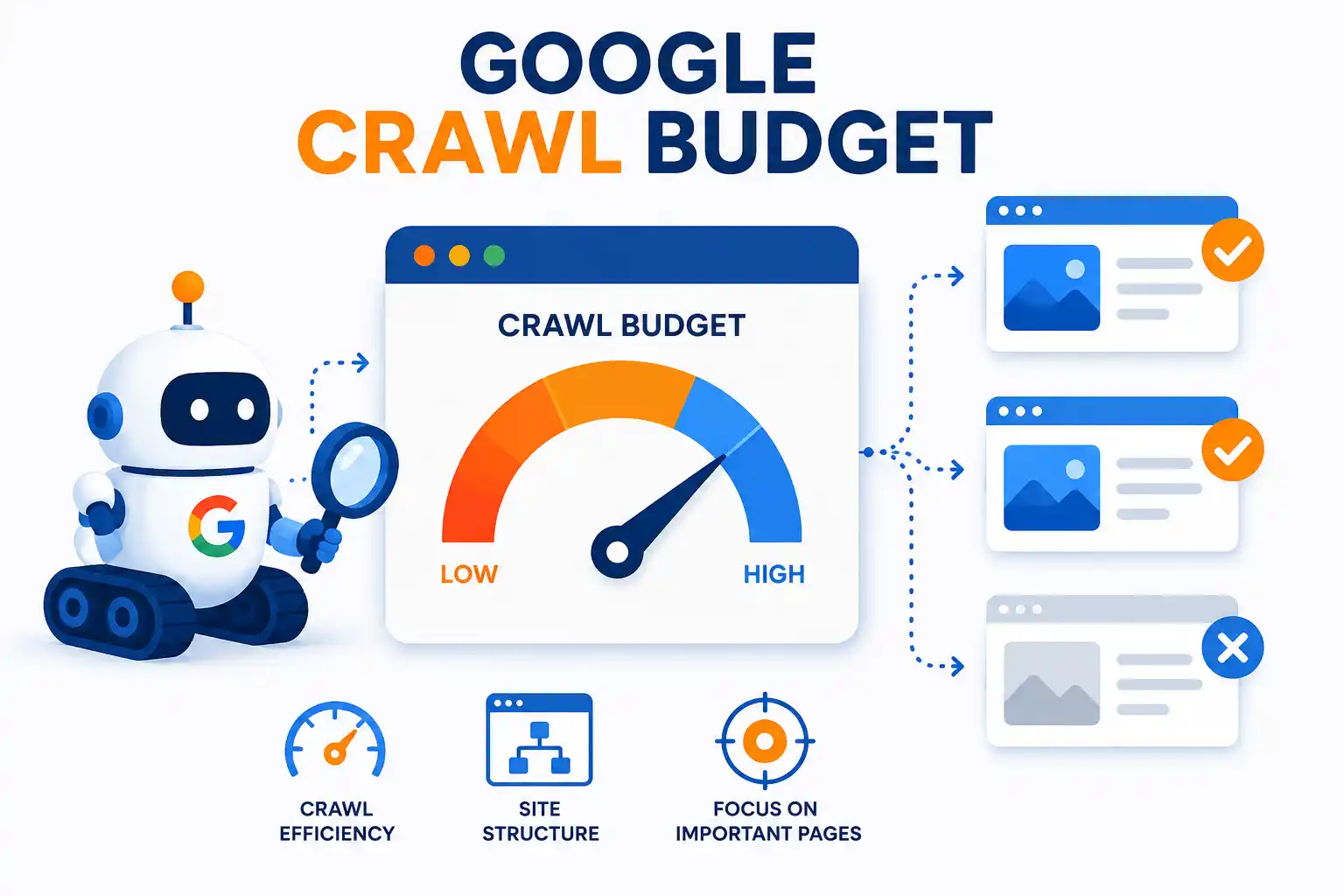
Crawl budget refers to the number of pages Google is willing and able to crawl on your website during a given period. For smaller websites, crawl budget is rarely an issue because Google can easily crawl all available pages.
However, for large websites with thousands—or even millions—of URLs, crawl budget becomes much more important. If Google spends time repeatedly crawling pages that haven’t changed, it may delay the discovery or indexing of newly published or updated content.
That’s why optimizing crawl efficiency can improve how quickly important pages appear in Google’s search index.
Google Recommends Using HTTP 304 Responses
Another major update to Google’s documentation is its recommendation to support HTTP 304 Not Modified status codes.
When a page hasn’t changed since Google’s last visit, returning a 304 Not Modified response tells Googlebot that it doesn’t need to download the page again. Instead, Google can continue using the cached version it already has.
This reduces unnecessary data transfers and saves valuable server resources.
Google’s documentation explains that if a page hasn’t changed since it was last crawled, returning a 304 response allows Google to reuse its cached copy instead of requesting the full page again. As a result, your server uses less bandwidth while Googlebot can spend more time crawling pages that actually contain new or updated content.
What Is a 304 Not Modified Status Code?
The HTTP 304 status code is part of the 3xx family of HTTP response codes. Although this category is technically known as “redirection,” a 304 response doesn’t actually redirect visitors or search engine bots to another page.
Instead, it simply tells the browser or crawler that the requested resource hasn’t changed since the previous request.
According to web standards, this allows the cached version of the page to be used without downloading the full content again.
For Googlebot, this means fewer unnecessary requests and more efficient crawling.
Benefits of Returning 304 Responses
Implementing 304 responses correctly offers several advantages for both website owners and search engines.
Some of the key benefits include:
Reduces unnecessary server load.
Saves bandwidth by avoiding repeated downloads of unchanged pages.
Helps Googlebot crawl websites more efficiently.
Allows crawlers to focus on newly published or updated pages.
Improves overall resource management for large websites.
While these improvements may not have a noticeable impact on small websites, they can make a significant difference for websites with massive content libraries or rapidly changing inventories.
Who Should Pay Attention?
Google notes that its crawl budget guidance is mainly intended for:
Enterprise websites with over one million pages.
Medium-sized websites with more than 10,000 pages that update frequently.
Large ecommerce stores.
News publishers.
Online marketplaces.
Directory and listing websites.
For smaller blogs or business websites with only a few hundred pages, crawl budget optimization is generally not a major concern. Google is usually able to crawl those sites without any issues.
Still, understanding how Googlebot works can help site owners build more technically optimized websites as they continue to grow.
More Than Just Two Updates
While the two biggest additions involve shared crawl capacity and HTTP 304 responses, Google also made several smaller revisions throughout the documentation.
These edits mainly improve the clarity and precision of Google’s explanations rather than introducing major new recommendations. The goal is to help developers and SEO professionals better understand how Google’s crawling systems operate.
Final Thoughts
Google’s latest crawl budget documentation reinforces the importance of efficient crawling, especially for large and frequently updated websites. The recommendation to support HTTP 304 Not Modified responses is a practical way to reduce server usage while helping Googlebot spend its crawl budget more effectively.
The clarification that all Google crawlers share the same crawl capacity is equally valuable. It reminds website owners that every crawler contributes to overall crawl activity, making efficient server responses even more important.
For enterprise websites and large publishers, implementing proper HTTP caching and 304 responses can improve crawl efficiency without requiring major infrastructure changes. While smaller websites may not experience dramatic benefits, following Google’s best practices can help ensure search engines crawl content as efficiently as possible as a site grows.
Read our detailed guide on what crawl budget is and how to optimize it for better SEO performance.
You log in one morning to check your Google Business Profile. Something feels wrong. Your listing has disappeared from Google Maps. There is a red or yellow banner across your dashboard. Your phone has stopped ringing entirely.
Your Google Business Profile (GBP) has been suspended.
This is one of the most stressful things a local business owner can experience. Businesses relying on Google Maps for phone calls and direction requests can lose 50 to 90 percent of new customer inquiries during a hard suspension, with no warning and no alternative route to those customers.
For a Houston plumber, an auto repair shop, a dental clinic, or any local service business, that kind of overnight visibility loss is a genuine revenue crisis.
The good news is that most GBP suspensions can be resolved. You just need to follow the right process in the right order. This guide walks you through every step, from understanding why the suspension happened to submitting a winning appeal.
Here is exactly what we cover:
What a GBP suspension is and why it happens
The difference between a soft suspension and a hard suspension
The most common triggers for GBP suspensions
How to audit your profile before you appeal
Which documents to gather for reinstatement
How to submit your appeal step by step
What to do if your appeal gets denied
How to prevent future suspensions
Let us get your profile back online.
What Is a Google Business Profile Suspension?
A Google Business Profile suspension is Google’s enforcement action against a listing. It happens when Google believes your profile violates its guidelines. Suspensions can happen with zero warning. You may only discover the suspension when a customer tells you they cannot find your business on Google Maps.
Google issues suspensions when a profile appears to violate guidelines or cannot be verified as eligible. There are two main types: soft suspensions and hard suspensions.
Understanding which type you have determines your very first steps.
Soft Suspension vs Hard Suspension
A soft suspension means your listing is still visible to the public on Google Maps and Google Search. But you lose the ability to manage your profile. You cannot respond to new reviews. You cannot post updates. You cannot edit your hours or services. Any edits you make sit in a “pending” state and do not go live.
For a soft suspension, Google trusts that the business is real and legitimate, but no longer trusts the user managing the profile. Your listing stays live with its old information while you work to regain management control.
A hard suspension is far more serious. For a hard suspension, the listing is removed entirely from all public search results. It is a revenue emergency. The phone stops ringing immediately.
Soft suspension recovery typically takes 3 to 7 days. Hard suspension recovery averages 1 to 4 weeks.
Both suspension types require a formal reinstatement request to Google. Both require you to fix violations before you submit anything.
Feature
Soft Suspension
Hard Suspension
What happens?
The business profile is disabled from the owner’s account
The profile is removed/suspended from Google’s ecosystem
Visibility on Google Maps/Search
Usually the profile may still appear publicly
Usually the profile is removed from Maps and Search
Owner access
Owner may lose management access
Owner and profile may both be removed
Main cause
Violation of GBP guidelines or verification issues
Serious/repeated guideline violations or major trust issues
Severity
Less severe
More severe
Appeal
Usually requires correcting the issue and submitting an appeal
Requires a stronger appeal and evidence proving the business is eligible
Example
Incorrect business name, address, category, or other profile information
Fake business, ineligible business, repeated violations, or significant spam
Why a GBP Suspension Is a Revenue Emergency
Many local businesses depend on Google Maps as their primary source of new leads. For home service companies, restaurants, medical practices, and auto repair shops, GBP drives the majority of daily phone calls.
A business with 200 four-star reviews suddenly shows nothing during a hard suspension. That review history may not be visible to potential customers even if it is not permanently deleted.
The situation compounds quickly. The rankings your listing occupied become available to competitors immediately. Rebuilding that position after reinstatement takes additional time beyond the suspension period itself.
A Houston HVAC company that loses its GBP listing during a Texas summer has no room for a weeks-long recovery. Speed matters. And the fastest path to reinstatement is doing everything correctly the first time.
Our Google Business Profile optimization services include a dedicated reinstatement service. Our team has successfully reinstated profiles for businesses across Houston and beyond.
Most Common Reasons Google Suspends a Business Profile
Google may suspend or restrict a Business Profile when it detects guideline or policy violations. Before you can fix anything, you need to understand what triggered your suspension. Google rarely tells you the exact reason. You have to investigate.
Here are the most common culprits.
1. Keyword Stuffing in Your Business Name
This is the single most common trigger for GBP suspensions. Business name violations top the list. Adding keywords, city names, or descriptors to your business name field instead of using your exact legal business name is the single most common trigger.
“Joe’s Auto Repair” should never become “Joe’s Auto Repair Best Mechanic Near Me Houston.” The business name must exactly match storefront signage and official documents. Remove all marketing taglines and keywords from the name field.
Even adding a single phrase like “Licensed and Insured” or “Open Sundays” can trigger an automated suspension. Your business name on GBP must match your real-world signage exactly.
2. Using a Virtual Office or P.O. Box Address
P.O. Boxes, virtual offices, mailboxes, or co-working spaces that are not permanently staffed by your business during stated hours are not eligible addresses for GBP.
If you operate from a co-working space or a shared office, Google wants to see that your business is physically staffed at that location during your listed hours. No signage or staff on site means your address is ineligible.
A mobile HVAC technician who lists his home address without hiding it as a service area business violates the rules. The correct configuration is a service area-only setup with the address hidden.
Service area businesses must hide their address and list only the areas they serve. Do not show a residential or non-commercial address on your public profile.
3. Duplicate Listings
If multiple Google Business Profile listings exist for the same business at the same address, Google’s algorithms flag them for review. A home services company whose previous marketing agency created three separate GBP listings at the same address saw all three suspended after a competitor report.
Search your business name and address in Google Maps before doing anything else. Check whether a previous marketing agency or a franchise system created extra listings. Duplicate listings must be removed or merged before you submit any appeal.
4. Suspicious Account Activity or Rapid Edits
Patterns that look like bulk spam management across multiple locations trigger account-level suspensions. Almost any update, including hour updates, can prompt an integrity check by Google’s algorithms.
Making multiple rapid changes to your business name, address, category, and phone number in a short window looks suspicious to Google’s automated systems. If you recently switched your business category, changed your address, and updated your hours all within a few days, that combination can trigger a flag.
5. Prohibited or High-Risk Business Categories
Certain business verticals face extra scrutiny and can be suspended if Google cannot verify they are legitimate and legally allowed to operate. Locksmiths and other sensitive categories are common examples.
Businesses in industries like locksmiths, bail bonds, financial services, and certain healthcare categories face more aggressive automated monitoring. These businesses often need to complete additional verification after reinstatement.
6. Inaccurate or Mismatched Business Information
Your Google Business Profile must be consistent with the information on your website, Yelp, Better Business Bureau, Facebook, and other major directories. Because almost any update can prompt an integrity check, it is critical to maintain a consistently accurate listing that aligns with information in other reputable online directories.
If your phone number on Google differs from your website, or your address format varies between platforms, Google loses confidence in your listing. Inconsistency is a significant red flag.
7. Fake or Incentivized Reviews
Never purchase or incentivize reviews. The risk is catastrophic. A single enforcement action for fake reviews can trigger a hard suspension and permanent removal of your review history.
A sudden burst of new reviews from accounts with no history, or reviews left in exchange for discounts, can look manipulative even when the intent is innocent. Build your reviews slowly and organically. That is what Google rewards.
Step 1: Identify Your Suspension Type
Log in to your Google Business Profile dashboard at business.google.com. Look for a suspended status notification or banner. This tells you what you are dealing with.
If your listing still appears on Google Maps but you cannot make edits go live, you have a soft suspension. If your listing has completely disappeared from public search and maps results, you have a hard suspension.
Both suspension types require a formal appeal to regain control. For a soft suspension, edits are in sandbox mode and do not appear on the public-facing profile. But Google’s reviewers will see these pending changes when they evaluate your appeal. Submitting while violations still exist almost guarantees a rejection.
Write down which type of suspension you have. This determines how urgently you need to act and what documents you need to gather.
Step 2: Audit Your Profile for Policy Violations
This step is non-negotiable. Do not skip it. Do not submit an appeal before completing this audit. Submitting before violations still exist almost guarantees a rejection.Review every section of your profile against Google’s guidelines for representing your business. Here is what to check.
Check Your Business Name
Does your business name exactly match your legal business registration and physical signage? Remove every keyword, tagline, city name, or descriptor. Your business name should be only your registered trade name. Nothing more.
Confirm Your Address and Service Area
Is your address a real, staffed, physical business location? If you are a service area business, is your address hidden and replaced with service area settings? Brick and mortar locations should show a precise address. Service area businesses should hide the address and list service areas only. Service areas must be within a 2-hour driving distance.
Review Your Business Categories
Is your primary category the most accurate reflection of your core service? Have you been switching categories frequently? Categories that do not match your actual business trigger automated flags. Choose only categories that exactly match your actual services.
Verify Your Website and Phone Number
Does the phone number on your GBP match the number on your website and across all directories? Does your website URL point directly to your actual business website with no redirect chains or mismatched domains? Call tracking numbers are allowed. But always add the main local business number as an additional phone number inside GBP so Google can still associate the listing with the primary line published across the web.
Make a list of every issue you find. Fix all of them before moving to the next step.
Step 3: Gather Your Supporting Documents
Google wants proof that your business is real, legitimate, and operating at the address listed on your profile. Start gathering these documents immediately while you complete your profile audit.
Proof of business legitimacy should include the business’s EIN and Articles of Incorporation or formation documents. Invoices alone are not sufficient. Sole proprietors should provide alternative proof such as bank statements, tax filings, or other official documents that clearly tie the individual to the business name and address.
Here is the full list of documents to prepare:
Your EIN letter from the IRS. Your Articles of Incorporation or state business formation document. Your business license or tax certificate. A lease agreement or utility bill showing your business name and address. Proof of business insurance. A recent business bank statement showing your business name. High-quality photos of your storefront exterior with visible permanent signage. Interior photos showing your branding and business space. For service area businesses, photos of your branded service vehicle.
Online evidence also helps. Provide links to social media profiles, Better Business Bureaulistings, major directory listings, and credible media mentions. These help Google verify that your business is legitimate and consistently represented online.
If you have more than four documents to attach, compile them into a single ZIP file. Alternatively, upload them to a Google Drive folder and include a shareable link in your appeal. Make sure the sharing settings allow anyone with the link to view the files.
Step 4: Fix All Violations First
Before you submit a single word to Google, fix every issue you identified in your audit. This is the most critical step that most business owners skip.
Remove keywords from your business name. Update your address or switch to service area configuration. Merge or delete duplicate listings. Correct any NAP inconsistencies across major directories including Yelp, Bing Places, Apple Maps, and industry-specific platforms.
Many business owners submit a reinstatement appeal the moment they discover a suspension without identifying and correcting the underlying issue. Google reviewers check for active violations at appeal time. Submitting before correcting prolongs the suspension and can delay subsequent appeals.
For soft suspensions, your fixes will appear as pending edits. Google’s reviewers will see these pending corrections when they review your appeal. This shows them you understand the issue and have addressed it.
If you want an expert to handle this audit and cleanup for you, our team at 4P Wisdom offers professional GBP optimization and reinstatement services. We have helped hundreds of businesses navigate this process successfully.
Step 5: Submit Your Reinstatement Request
With your violations fixed and your documents ready, it is time to submit your formal appeal to Google.
Here is the exact process to follow.
Sign in to Google Business Profile at business.google.com. Open your suspended location in the dashboard. Click the “Learn More” button that appears on the suspended listing screen. This will show you Google’s policy details and link you to the reinstatement request form.
Find your Google Business Profile ID. Search for your business while logged in to the managing Google account. Click “View Profile.” Open the three-dot menu, then click “Business Profile Settings,” then “Advanced Settings.” Copy the Profile ID shown at the top.
Important: The 60-Minute Document Upload Rule
Once you open the evidence upload form in Google’s appeals tool, you have exactly 60 minutes to submit your documents or they will not attach to the appeal. You must have all your files ready and organized before you click.
This is critical. Do not open the form until every document is named, organized, and sitting on your desktop ready to upload. A rushed or incomplete document submission is one of the top reasons appeals get denied.
Upload your business documents and photos. Provide links to your BBB listing, Yelp profile, social media pages, and any press mentions or media coverage of your business. Submit the form and monitor your email for responses from Google Support.
Step 6: Write a Clear and Factual Appeal Explanation
The appeal explanation box is where many business owners hurt their chances. They write emotional appeals. They argue with Google. They make vague claims.
Do not do any of that.
Be concise and factual. A strong example explanation reads like this: “We removed marketing keywords from the business name and updated our service area settings to hide the address per guidelines.” That is it. State what was wrong and what you fixed.
Your appeal explanation should include a brief statement of your business type and location. It should state clearly what issue existed and exactly what you corrected. It should list the documents you are providing and what each one proves.
Here is a template you can adapt:
“[Business Name] is a [business type] serving [city/area]. We identified that our business name contained keywords beyond our legal trade name. We have corrected the name to match our legal registration and physical signage. We have also confirmed our NAP data is consistent across major directories. Enclosed, please find our EIN letter, Articles of Incorporation, business license, and storefront photos showing our signage. Links to our BBB and Yelp profiles are also included for verification.”
That kind of clean, factual explanation helps Google’s reviewer process your case quickly. It shows you understand the guidelines and have taken them seriously.
Step 7: Follow Up If You Do Not Hear Back
Suspension reviews typically take a minimum of 24 hours to several days or weeks. Complex cases or sensitive business categories can take significantly longer.
If two weeks pass with no response, post in the Google Business Profile Help Community forum. Google Product Experts monitor this forum. They can sometimes escalate stuck cases or identify missing information in your appeal.
When you post in the community forum, keep your post professional and factual. Do not share sensitive documents publicly. The forum is public. Do not upload EIN letters, Articles of Incorporation, bank statements, leases, insurance policies, or IDs. Share those documents only through Google’s official reinstatement tools.
State your business name, your category, your city, and the date your suspension began. List the documents you submitted. Note any specific reason Google provided in the suspension notification. Ask clearly whether there are compliance gaps you should address.
Reply to any follow-up requests from Google Support promptly. Additional documentation requests are normal. Respond within 24 hours wherever possible.
What to Do If Your Reinstatement Appeal Is Denied
A denial is not the end. Most denials happen because of incomplete evidence or unresolved violations. Read Google’s denial email carefully. It will usually give you clues about what needs to be stronger.
If your request is denied, carefully reread Google’s email, correct remaining issues, and reapply with stronger evidence. Do not submit repeated appeals without making changes.
Strengthen Your Evidence
If your first appeal was denied, your evidence was not convincing enough. Return to your document list. Add clearer exterior photos showing permanent signage from street view distance. Add a utility bill showing your business name at the physical address. Add your business insurance certificate. Gather any press coverage or media mentions of your business to include as additional credibility.
Align Your Online Presence
A denial often signals that your online presence does not match your GBP data well enough. Check your website. Does it clearly display your business name, address, and phone number? Does it have dedicated service pages that describe what you do? Check your NAP on every major directory. Fix every inconsistency you find.
Align major directories, social profiles, and your website so they match the GBP name, address, phone, and services precisely. The stronger your consistent online footprint, the more likely Google will trust your reinstatement request.
Our GBP optimization checklist walks you through exactly how to build a profile that Google trusts and rewards. If your denial seems related to a weak online presence, start there.
How to Prevent Future GBP Suspensions
Getting reinstated is stressful. Getting suspended again after reinstatement is worse. Here is how to protect your profile going forward.
Always Use Your Exact Legal Business Name
Never add keywords, cities, or descriptors to your GBP business name. Your legal business name is what appears on your business registration, tax documents, and physical signage. That is what goes in the business name field. Nothing else. Ever.
Only List Addresses Where You Actually Operate
If you are a service area business, hide your address and configure proper service area settings. If you have a physical storefront, confirm that your address pin is placed correctly on Google Maps. Never use a virtual office, P.O. box, or co-working space as your listed address unless your business is permanently staffed there during all listed hours.
Check for Duplicate Listings Regularly
Audit existing listings before creating new ones. Search your business name and address in Google Maps to check for duplicates your previous agency or franchise system may have created. Remove or report duplicates before they trigger a suspension.
Keep Your Profile Data Consistent Across All Platforms
Your business name, address, and phone number must be identical across your website, Google, Yelp, Facebook, Better Business Bureau, Apple Maps, and every other directory where your business is listed. Even minor differences in address formatting create inconsistency signals that can trigger reviews.
Build Reviews Organically and Consistently
Ask satisfied customers for reviews after every positive interaction. Send a simple follow-up message with a direct link to your GBP review page. Aim for a steady, consistent flow of new reviews over time. Review velocity matters. A steady flow consistently over time is more valuable than a sudden burst followed by silence.
Never buy reviews, offer incentives for reviews, or ask employees to write reviews as customers. The risk of a hard suspension far outweighs any short-term benefit.
Protect Your Google Account
Enable two-factor authentication on the Google Account that manages your GBP. Unauthorized access to your account can lead to profile edits that trigger an automatic suspension. Keep your account credentials secure and do not share login access with people you do not fully trust.
Avoid Making Multiple Major Edits Quickly
Letting multiple agencies manage the same listing simultaneously can trigger suspicious activity flags. Conflicting edits from two agency accounts confuse Google’s systems. If you are changing agencies, make sure the previous agency removes themselves as a manager before the new team takes over.
If you need to update your business address, category, or name, make one change at a time. Allow a few days between major edits. Give Google’s systems time to process each change without flagging your profile for unusual activity.
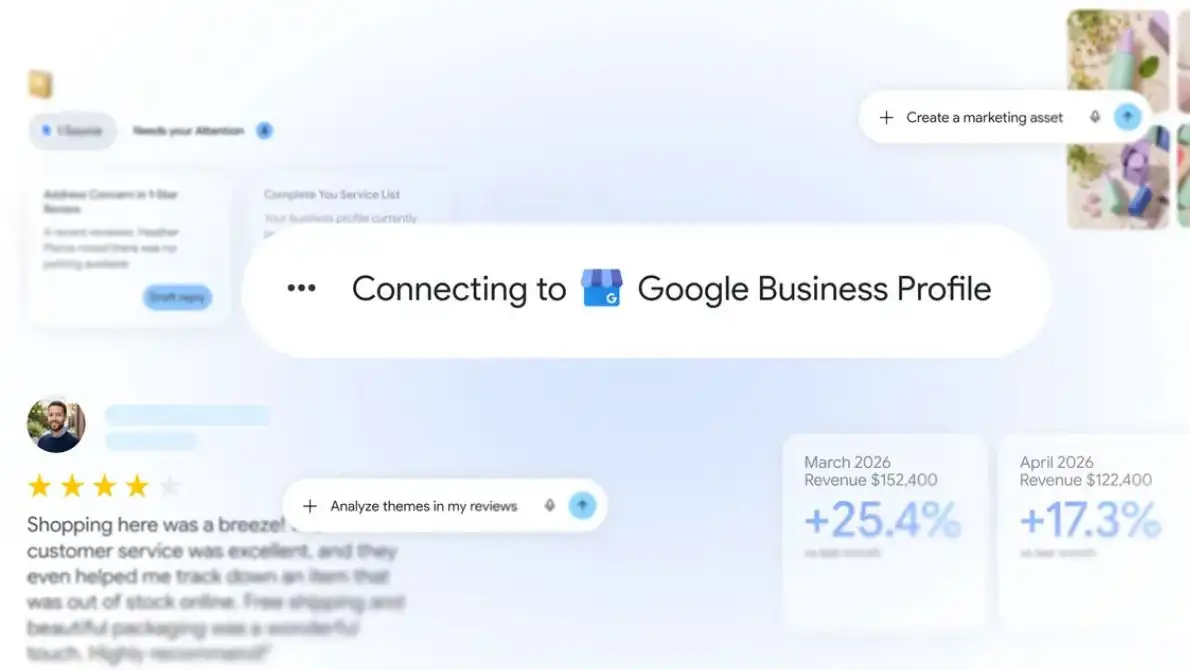
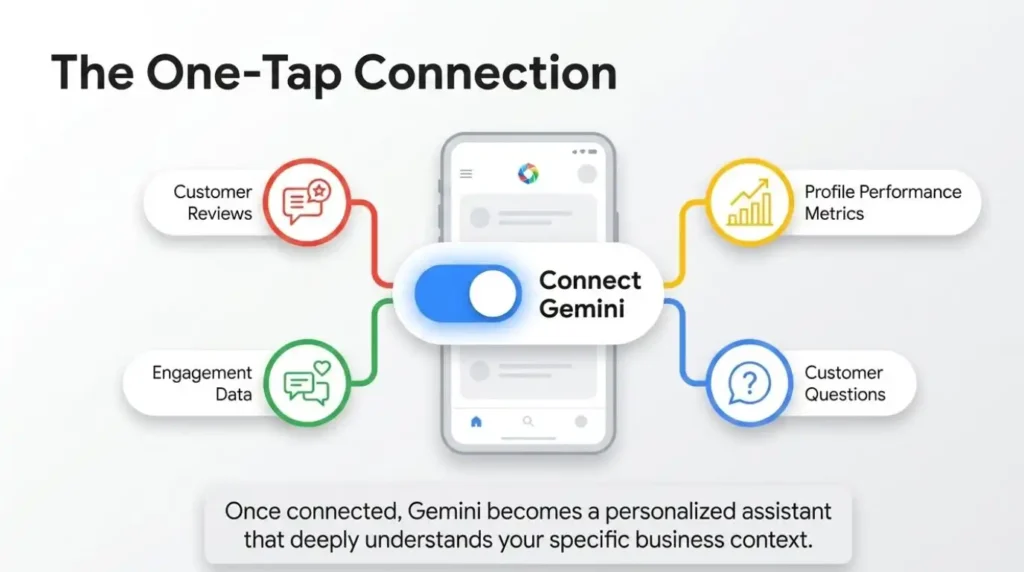
You can also read about how Google is integrating GBP management into its AI tools by checking our coverage of Google bringing Business Profile management tools to Gemini. Understanding how Google is evolving its platform helps you stay ahead of compliance requirements.
Frequently Asked Questions About GBP Suspension Appeals
1. How long does a Google Business Profile suspension appeal take?
Suspension reviews typically take a minimum of 24 hours to several days or weeks. Complex cases or sensitive categories can take longer. Soft suspension appeals often resolve in 3 to 7 business days. Hard suspension appeals typically take 1 to 4 weeks. Cases involving multiple violations or sensitive business types can take 6 weeks or more. Submitting a complete, accurate appeal with strong documentation gives you the best chance of a fast resolution.
2. What documents do I need to submit for a GBP reinstatement request?
The most important documents are your EIN letter, Articles of Incorporation or business formation documents, business license or tax certificate, a utility bill or bank statement showing your business name and address, proof of insurance, and high-quality photos of your storefront signage and interior. Primary documentation should include the business’s EIN and Articles of Incorporation. Invoices alone are not sufficient. Sole proprietors should include bank statements or tax filings that tie their name to the business address.
3. Can I submit a new appeal if my first one gets denied?
Yes. But only after you make meaningful corrections and strengthen your evidence. If denied, carefully reread Google’s email, correct remaining issues, and reapply with stronger evidence. Do not resubmit without making changes. Submitting the same appeal a second time without changes does not improve your outcome and may cause delays.
4. Will my Google reviews be deleted if my profile is suspended?
During a hard suspension, your reviews become hidden from public view. They are not automatically deleted. In most reinstatement cases, your review history is restored when the profile goes live again. However, a hard suspension that involves severe policy violations may result in permanent profile removal, in which case reviews can be permanently lost. This is one of many reasons to protect your profile health proactively.
5. Can a competitor get my Google Business Profile suspended?
Yes, competitors can file reports against your listing. Competitors can report your listing for guideline violations. If your listing is fully compliant, reports are unlikely to trigger a suspension. Non-compliant listings with keyword-stuffed names or incorrect addresses are more vulnerable to competitor reports being actioned. The best protection against competitor reports is maintaining a fully compliant profile at all times.
Let 4P Wisdom Handle Your GBP Reinstatement
At 4P Wisdom, we specialize in Google Business Profile optimization and reinstatement for local service businesses across Houston, Texas, and beyond. Our team knows exactly what Google’s reviewers look for. We have successfully reinstated profiles for auto repair shops, dental clinics, HVAC companies, law firms, and dozens of other business types.
If your profile is currently suspended, do not wait. Every day without your GBP listing costs you real customers and real revenue.
Our Google Business Profile services include full profile audits, violation identification, document preparation, appeal submission, and ongoing optimization to prevent future suspensions.
Many businesses treat their Contact Us page as just a place for a contact form, phone number, or address. But it can do much more than that. A well-designed contact page can build trust, improve your local SEO, and turn more visitors into paying customers.
At the Whitespark Local Search Summit, former Google engineer Joel Headley shared an important insight. Google actively crawls Contact Us pages to collect business information. It uses this data to better understand and verify your Google Business Profile. That means a detailed contact page can benefit both your customers and your search rankings.
In fact, 83% of customers say they feel more loyal to brands that respond to and resolve their complaints. On top of that, 50% of marketers report that online forms are their highest-converting lead generation tool.
Many multi-location businesses create detailed location pages with helpful content. In contrast, most single-location businesses keep their contact page very basic. This is a missed opportunity.
By adding the right information, your Contact Us page can become a powerful marketing tool. In this guide, you’ll learn the key elements every high-converting local Contact Us page should include.
Include Complete and Accurate Contact Information
It may sound obvious, but many businesses leave out important details on their Contact Us page. The more helpful your page is, the easier it is for customers to reach you.
Make sure you include:
A friendly welcome message and short introduction
Your business name
A contact form and a direct email address (it’s best to offer both)
Your full business address
Your phone number
Your business hours
Shopping options, such as in-store pickup, curbside pickup, delivery, or appointment-only services
Accepted payment methods
Parking information, if applicable
Add Trust Signals and Social Proof
People want to feel confident before they contact a business. They want to know they’re dealing with a trustworthy company. Adding trust signals to your Contact Us page can help visitors feel more comfortable taking the next step.
Set Clear Expectations
Tell visitors exactly what happens after they contact you. This removes uncertainty and builds confidence.
Include details like:
How quickly you’ll respond (for example, within 24 hours or two business days)
What happens after they submit the form or call your business
Anything that makes your business different, such as your experienced team, personalized service, or local expertise
Showcase Your Credibility
Highlight the achievements and organizations that support your reputation. These trust signals reassure visitors that they’re choosing a reliable business.
Consider including:
Industry certifications and professional credentials
Memberships in local or national industry associations
Your local Chamber of Commerce membership
Professional organizations or networking groups
Better Business Bureau (BBB) rating
Awards your business has won
Media features or press mentions, with links where possible
If your business has received significant media coverage or industry recognition, create a dedicated section to showcase it.
Display Customer Reviews and Testimonials
Customer reviews are one of the best ways to build trust. They show potential customers that real people have had a positive experience with your business.
Add reviews and testimonials directly to your Contact Us page. If possible, include the customer’s name, city, photo, and a link to the original review or their website. This makes the testimonials feel more authentic.
You should also display your overall star rating and the total number of reviews. Keep in mind that customers don’t expect a perfect 5-star rating. In fact, research shows that businesses with ratings between 4.0 and 4.7 stars are often seen as more credible than those with a perfect score.
Reviews do more than build confidence. They also add fresh, unique, and locally relevant content to your page. That can improve your local SEO while helping more visitors become customers.
Add Location-Specific Content
Your Contact Us page should show visitors that you’re part of the local community. Adding location-specific content helps customers trust your business and gives search engines more context about where you operate.
Here are a few ideas:
Introduce your team with photos and short bios.
Add pictures of your office, storefront, or team at work.
Explain what your business does and who you serve.
Highlight what makes your business different from competitors.
Mention well-known neighborhoods or landmarks near your location.
Include information about guarantees, warranties, or price-match policies.
Share upcoming events, community involvement, or local partnerships.
Answer a few frequently asked questions (FAQs).
List the cities, neighborhoods, or service areas you cover if you serve customers beyond your physical location.
Optimize Your Contact Page for Local SEO
A great Contact Us page should be optimized for both visitors and search engines. Here are the key elements to focus on.
Write an Optimized Title Tag
Your title tag is one of the most important on-page SEO elements. Include your primary keyword, your city, and your business name.
A simple format is:
Primary Keyword + City | Business Name
You can also add nearby neighborhoods or service areas to make the page more relevant for local searches. While only part of the title may appear in search results, Google can still use the full title to understand your page.
Create a Helpful Meta Description
Your meta description should clearly explain what visitors will find on the page. Include a short overview of your business, your location, and the best ways to contact you. Write it for people first, not search engines.
Add Internal Links
Link to important pages on your website, such as your services, about page, or blog posts. Internal links help visitors find more information and make it easier for search engines to understand your site.
Use Relevant External Links
Linking to trusted local resources can add value for visitors. For example, you might link to your local Chamber of Commerce, city website, or industry organization when it’s relevant.
Include a Clear Call to Action
Don’t make visitors guess what to do next. Use clear calls to action throughout the page to encourage them to contact your business.
Examples include:
Request a Quote
Schedule a Consultation
Call Now
Book an Appointment
Get in Touch
Your call-to-action buttons should stand out and be easy to tap on mobile devices.
Embed Your Google Business Profile Map
Adding your Google Business Profile map makes it easy for customers to find your location and get directions. It also reinforces the connection between your website and your Google Business Profile, which can support your local SEO efforts.
Turn Your Contact Page into a Conversion Page
If you have one physical location, your Contact Us page also serves as your local landing page. If you have multiple locations, create a dedicated page for each one with unique local content.
Think of every Contact Us page as a landing page designed to convert. Make it easy for people to contact you, answer their questions, build trust, and give them a clear reason to choose your business.
A well-optimized Contact Us page can improve your local rankings, increase qualified leads, and help turn more visitors into loyal customers.
20 Best Contact Us Page Examples and Why They Work
HostPapa: HostPapa offers 24/7 global support with international phone numbers, live chat, email, and a unique one-on-one video training session. The clean layout minimizes scrolling and features a prominent green CTA for customer care videos. Contact HostPapa
Embark: Embark builds trust with human faces and clearly displays multiple contact methods, including phone, email, and a responsive form. Large text and elegant branding enhance readability and accessibility. Contact Embark
Thrive Agency: Thrive features a bold contact form and multiple phone numbers. Below the fold, social proof like reviews and client results builds credibility for lead generation. Contact Thrive
Nextiva Nextiva provides large interactive buttons, a human-like AI chat, and a helpful search bar. It balances self-service autonomy with quality human support options. Contact Nextiva
Codica: Codica stands out with a human-like AI chat, “Get a free quote” CTA, and a named sales manager (Taya) promising quick responses. Awards add legitimacy. Contact Codica
Google: Google emphasizes self-guided support with an advanced search bar, product-specific help centers, and community forums. Fast loading and seamless UX are expected standards. Google Contact
WebFX: WebFX displays multiple phone numbers prominently above the fold. The simple white form and listed office locations make it ideal for phone-first customers. Contact WebFX
HubSpot: HubSpot offers clear CTAs for Sales and Support, integrated portal access, and a live chatbot. It creates a convenient omnichannel experience. Contact HubSpot
Zapier: Zapier uses bright orange branding and highlights 24-hour human support. Trust-building quotes and buttons like “Connect with a human” energize the page. Zapier Support
Pixpa: Pixpa features a clean blue-and-white gradient, a contact form, and resources such as the Help Centre and “Hire a Pixpa Expert.” 24/7 live chat ensures quick help. Contact Pixpa
Asana: Asana delivers a simple, scroll-less layout with large fonts and an integrated AI chatbot. Responsive design prioritizes user-friendly interaction. Asana Support
Zendesk: Zendesk focuses on simplicity with bold CTAs, an AI chatbot, and a calming color palette. Mobile-friendly design promotes professionalism. Zendesk Contact
Netflix: Netflix uses a search bar leading to articles and one-click text/chat or call options. Minimal layout ensures smooth navigation across devices. Netflix Help
Ahrefs: Ahrefs excels in self-enablement with a beautifully designed Help Center, search, categories, and articles. White-blue gradient keeps it uncluttered. Ahrefs Help Center
Apple: Apple provides an advanced search bar, account sign-in for personalized support, and product selection. Highly responsive on all devices. Apple Support
Squarespace: Squarespace masters minimalism with just three clear buttons. Clean black-and-white design avoids overwhelm while directing users effectively. Squarespace Contact
Medium: Medium offers bright blue search and categorized buttons for common issues. Simple navigation with request submission options. Medium Support
Shopify: Shopify features a large AI chat panel and structured self-help links under clear headings. Strong focus on self-service. Shopify Support
Mailchimp Mailchimp provides an AI assistant, dropdown topics, and a contact form. Responsive design with bold, readable copy. Mailchimp Contact
Toyota:: Toyota prioritizes FAQs with large CTA buttons for common concerns. Phone support is available further down. Toyota Contact
Skool: Skool keeps it ultra-simple with heading, address, email, and phone. Perfect basics for easy access. Skool Contact
Slack: Slack uses email capture, topic selection, help center links, and a search bar. Purple accents and human images add personality. Slack Support
PandaDoc: PandaDoc offers large bold buttons for “Contact sales” or demo requests, plus a simple contact form. White layout keeps it readable. PandaDoc Contact
Fiverr: Fiverr prioritizes self-help with search and links, using a vibrant dark green palette. Easy navigation for freelancers and clients. Fiverr Support
Salesforce: Salesforce delivers omnichannel variety with quick live chat, callback form, and prominent numbers. Responsive and interactive. Salesforce Contact.
Final Thoughts
A high-converting local Contact Us page is much more than a place to list your phone number or email address. It is a valuable opportunity to build trust, answer questions, and encourage visitors to take action.
By using a friendly headline, displaying clear contact information, keeping your form simple, adding trust signals, showcasing your location, and making the page mobile-friendly, you create a better experience for potential customers. Optimizing your page for local SEO and regularly testing its performance can further increase leads and conversions.
Remember, people who visit your Contact Us page are often ready to connect with your business. Make it as easy as possible for them to reach you, and you’ll turn more website visitors into loyal customers.
The way customers find service businesses has completely changed. A homeowner in Houston no longer scrolls through pages of links. They open Google and get an AI-generated answer instantly. A business owner types “best auto repair near me” into ChatGPT. The AI recommends one shop by name. That shop gets the call.
This is the new reality of AI search SEO. If your service business is not ready, you are losing customers every single day.
In this guide, you will learn exactly how to win in this new search landscape. Here is what we cover.
Let’s get started.
What Is AI Search SEO?
AI search SEO is the practice of optimizing your content for AI-powered search platforms. These platforms include Google AI Overviews, ChatGPT, Perplexity, Microsoft Copilot, and Google Gemini.
Traditional SEO gets your website to rank in a list of blue links. AI search SEO gets your business cited inside the AI-generated answer itself.
That is a huge difference for service businesses.
When a user asks “who is the best plumber in Houston,” Google AI does not list ten websites. It picks two or three trusted sources and builds an answer from them. Your job is to become one of those sources.
Generative Engine Optimization (GEO) is the formal name for this practice. You may also see it called Answer Engine Optimization (AEO) or Large Language Model Optimization (LLMO). All three terms describe the same goal: make your content easy for AI to find, trust, and cite.
For a Houston auto repair shop, a dental clinic, an HVAC company, or a law firm, this shift creates a real opportunity. The businesses that adapt early will dominate their markets. The businesses that wait will become invisible.
How AI Search Differs from Traditional SEO
Traditional SEO focuses on ranking your website in Google’s organic results. You target keywords, build backlinks, and optimize your pages. Then you hope people click your link.
AI search works differently. The AI reads hundreds of sources simultaneously. Then it synthesizes one clear, confident answer. It picks the most credible and relevant sources to build that answer.
By 2026, visibility depends less on page position and more on whether a brand gets cited within AI-generated responses. AI-referred visitors browse 12% more pages per visit and show a 23% lower bounce rate than non-AI referrals.
That means AI-driven traffic is higher-quality traffic.
For service businesses, this changes everything. A customer who arrives via an AI recommendation is already primed to buy. They did not just click a random link. The AI told them to trust you. That is a powerful endorsement no organic listing can replicate.
Here is the clearest way to understand the difference:
Traditional SEO: Rank in the list. Get the click. Hope for a conversion.
AI Search SEO: Become the answer. Get named. Earn trust before the first click.
Studies show that appearing in position one is less valuable than being cited in an AI Overview for high-intent queries. That tells you everything about where your energy needs to go.
Why Service Businesses Must Act Right Now
Most service businesses are not ready for AI search. Industry data shows that 88% of local businesses have no active strategy to appear in AI search results.
That is a massive opportunity for businesses that move early.
First Page Sage data from 2026 shows that local SEO campaigns deliver a 700% average return on investment for service-based businesses within 6 to 12 months. Those who commit to a consistent, long-term plan face very little competition at the top.
Let us look at a real-world example. An HVAC company in Houston starts optimizing for AI search in January. They build FAQ content, add schema markup, and strengthen their Google Business Profile. By March, they appear in Google AI Overviews for “best HVAC repair Houston.” Their call volume doubles.
Meanwhile, their competitor continues chasing traditional keyword rankings. They drop off the first page entirely. Their phone stops ringing. The window to gain early mover advantage is open right now. But it will not stay open forever.
Strategy 1: Optimize for Google AI Overviews
Google AI Overviews appear above organic results for millions of search queries every day. Ahrefs data shows AI Overviews have cut clicks to top-ranking content by up to 58%. Meanwhile, 65% of local searches already end without a click to a website.
That means the traffic that used to land on your website is now being captured by AI answers. Getting featured in those answers is now the priority.
Answer Questions Directly at the Top of Each Page
AI Overviews extract short, clear answers from web pages. Google’s AI looks for content that directly answers the user’s question. If your page buries the answer three paragraphs down, the AI will not find it.
Start each service page with a direct, concise answer. Then expand with supporting details below. This format works perfectly for AI extraction and also improves conversion rates with human readers.
For example, an auto repair shop in Houston could open their brake repair page like this: “Our Houston brake repair service typically takes 45 to 90 minutes.” Simple, direct, and ready for AI to cite.
Write FAQ Sections on Every Service Page
Structured FAQ content on service pages gives AI Overviews ready-made passages to extract. FAQ schema markup signals to Google and AI crawlers that your content contains direct answers.
Add 4 to 6 FAQ questions at the bottom of every service page. Write the answers in plain, conversational language. Keep each answer under 60 words. Make sure each question matches what real customers actually ask.
Use Clear Heading Structures
For a successful GEO strategy, structured content is essential. AI systems prefer clearly structured information with logical headings and paragraphs. Precise, context-rich answers are directly, concisely cited preferentially.
Use H2 and H3 tags to break content into scannable sections. One topic per section. This makes it easy for both humans and AI to navigate your pages confidently.
Strategy 2: Build Topical Authority with Content Clusters
Topical authority is the new foundation of AI search SEO. AI systems trust businesses that cover a topic deeply and comprehensively. A single blog post is not enough. You need a content ecosystem.
Topical authority, built through clusters of related, in-depth content, carries more weight than keyword density for AI search visibility.
A content cluster is a group of related pages built around one core topic. You create a pillar page that covers the topic broadly. Then you create several supporting blog posts that go deep on specific subtopics. All of them link back to the pillar page.
Here is a real-world example. A roofing company in Houston wants to rank for roofing-related AI queries. Their pillar page covers “Roof Repair in Houston.” Their supporting pages cover topics like:
How much does roof repair cost in Houston? How long does a roof repair take in Texas? Roof repair vs roof replacement: Which is right for you? How to find a licensed roofer in Houston? What types of roof damage are most common after Texas storms?
Together, these pages build a topic cluster. Google’s AI recognizes the company as a genuine authority on roofing in Houston. It begins citing their content in AI Overviews for local roofing queries.
If traditional SEO was about earning a spot among 10 blue links, GEO is about earning a place among the two to seven domains large language models typically cite in a single response. When an AI engine names your brand in its answer, it delivers an implicit endorsement no organic listing ever could.
Our content marketing services help service businesses build these exact content ecosystems. We research the right topics, write the content, and structure everything for maximum AI visibility.
Strategy 3: Use Schema Markup and Structured Data
Schema markup is code you add to your website. It tells search engines and AI systems exactly what your business does, where you operate, and how customers can contact you.
Entity recognition, not just keyword matching, now determines which businesses get cited in AI-generated answers. Structured data markup is the bridge between your content and an AI engine’s ability to surface it.
Here are the most important schema types for service businesses.
LocalBusiness Schema
This tells AI systems your business name, address, phone number, hours, and service area. Every service business needs this as a baseline. LocalBusiness schema with the type property set to your specific business type, such as Dentist, Plumber, or RoofingContractor, is the baseline requirement.
An auto repair shop in Houston would use the “AutoRepair” schema type. A salon would use “HairSalon.” Getting this right ensures AI systems accurately understand and categorize your business.
Service Schema
Wrap each of your service pages in a Service schema. This clearly tells AI what specific services you offer. A dental office uses separate Service schema for teeth cleaning, root canals, and whitening. This level of specificity helps AI recommend you for very specific queries.
FAQ Schema
FAQ schema transforms your FAQ section into AI-ready data. Google can extract these answers directly into AI Overviews. Use structured data for FAQs. FAQ schema markup signals to Google and AI crawlers that your content contains direct answers. Keep your NAP data consistent everywhere. AI platforms cross-reference multiple sources to verify credibility.
AggregateRating Schema
This schema pulls your star ratings from verified review platforms. It increases trust signals for AI engines. More reviews with higher ratings improve your chances of being cited in local AI answers.
AI systems like ChatGPT, Perplexity, and Claude use structured data to evaluate and recommend local businesses. Schema markup is non-negotiable for service businesses in 2026. AI systems prioritize credibility and availability.
Strategy 4: Strengthen Your EEAT Signals
EEAT stands for Experience, Expertise, Authoritativeness, and Trustworthiness. Google and AI systems use EEAT signals to decide which sources to trust and cite.
For service businesses, EEAT is about proving you are the real deal. You cannot just tell Google you are trustworthy. You have to show it through consistent signals across your website and the broader web.
Showcase Real Credentials
Display your licenses, certifications, and professional memberships prominently on your website. An HVAC company should display their EPA certification on every page. A plumber should list their state license number. An auto repair shop should show their ASE certified mechanics by name.
AI emergency service recommendations are a new frontier for trades businesses. You must optimize your EEAT signals through certifications, reviews, and structured data. To be recommended, you need proper schema markup identifying your business type, clearly stated service areas and emergency availability, and visible credentials.
Feature Real Team Members
Create an About page with real names, photos, and bios. AI systems trust businesses with verifiable human experts. A Houston HVAC company that names their lead technician and lists their certifications signals strong EEAT to both Google and AI platforms.
Collect and Display Customer Reviews
Google AI prioritizes businesses with consistent, recent reviews from real customers. Encourage every satisfied customer to leave a Google review. Respond to all reviews, including negative ones. This signals accountability and trustworthiness to AI systems.
Earn Mentions from Trusted Sources
Get your business mentioned on local news websites, industry publications, and community organizations. A mention in the Houston Chronicle carries more trust weight than ten generic directory listings. These mentions build your brand entity in AI knowledge graphs.
Publish Original Research and Real Case Studies
Share your own data, results, and customer success stories. These are things AI cannot find anywhere else. Original insights make your content uniquely citable. A Houston roofing company that publishes data from their own completed jobs is impossible to duplicate.
Our SEO services include a full EEAT audit for your website. We identify exactly what trust signals you are missing and help you build them systematically.
Strategy 5: Optimize Your Google Business Profile for AI Search
Your Google Business Profile (GBP) is one of the most powerful AI search signals for local service businesses. Google’s AI pulls directly from GBP data when building local answers.
For service queries like “best HVAC repair near me” or “emergency dental near me,” Google pulls from Business Profiles, review platforms, and structured website content simultaneously.
A fully optimized GBP dramatically improves your chances of appearing in AI generated local answers. Here is what to optimize:
Choose the most specific business category available to your business. Write a keyword rich business description that includes your city and core services. Upload fresh, high quality photos every single month. Post weekly updates using the Google Posts feature. Add your complete service list with detailed descriptions. Keep your hours and contact details 100% accurate at all times. Actively collect and respond to every review you receive..
In 2026, success is the combination of Google Business Profile dominance, review velocity, service and city page architecture, seasonal content, technical schema, and AI search visibility. The winners treat all of these as one unified system.
Our local SEO services include complete Google Business Profile optimization. We manage your profile so AI keeps recommending your business to local customers month after month. Read our complete guide on Google Business Profile optimization checklistfor bigger picture.
Strategy 6: Target Conversational and Long Tail Queries
AI search is built around conversational queries. Users do not type “plumber Houston” into ChatGPT. They ask “who is the best licensed plumber in Houston available on weekends?”
This shift requires a new approach to keyword research and content creation. You need to identify the specific questions your customers ask. Then you need content that answers each question directly and completely.
When someone asks an AI a complex question, the AI breaks it into smaller sub-queries and searches for each one separately. These are called fan-out queries. Make sure you have content that ranks for these shorter sub-queries too. Use the same terminology the AI might search for.
For a Houston electrician, this means creating dedicated content that answers:
“How much does it cost to rewire a house in Houston?” “Is rewiring a house worth it for older homes?” “How long does a full house rewire take in Texas?” “What permits do I need for electrical work in Houston?”
Each of these is a standalone AI query. Each deserves its own focused page or content section on your website. Together, these pages build authority for your entire electrical services topic.
Choose long-tail and question keyword queries. These are less competitive and more promising for conversion. They work especially well in AI responses. Apply LSI and semantic clustering to build topical authority by covering entities and concepts around your core topic.
Our keyword research services identify the exact conversational queries your target customers use. We map these to the right content formats for maximum AI search visibility.
Strategy 7: Win with Digital PR and Brand Mentions
AI systems learn which brands to trust through digital PR and consistent brand mentions. When trusted websites mention your business by name, AI treats your brand as a credible authority. This is sometimes called brand entity optimization or off page EEAT.
Measure AI citation frequency, which is how often your brand appears in AI generated answers. Track share of voice, which is your mentions versus competitors across AI platforms. Monitor citation sentiment, which is whether AI accurately and positively presents your brand.
Here is how service businesses can build meaningful brand mentions.
Reach out to local news outlets and pitch genuinely helpful stories. A Houston HVAC company could pitch a story about energy saving tips for brutal Texas summers. This earns a media mention and a backlink from a trusted local source. Both strengthen your AI authority.
Contribute expert quotes to industry blogs and home improvement websites. When a popular blog is writing about water heater maintenance, your plumber can provide an expert comment. This builds authority and gets your brand name in front of a new audience.
Get listed in credible local directories. These include the Better Business Bureau, Yelp, Angi, Houzz, and industry specific platforms. City specific local backlinks from regional directories, local news outlets, or community organizations significantly improve rankings in secondary service areas.
Sponsor local events and community organizations in your city. Sponsorships often earn mentions on trusted local websites. A Houston garage door company that sponsors a neighborhood charity run may earn a mention on that charity’s website. AI systems see that mention and add it to your brand’s trust profile.
Strategy 8: Keyword Research Built for AI Search
Keyword research for AI search looks different from traditional keyword research. You still need to find what people search for. But you also need to understand how AI interprets those searches and what kinds of content AI chooses to cite.
Start from broad seed keywords and then group them by intent. Queries can be informational, navigational, transactional, or commercial investigation type. Hybrids are common and you need to cover several aspects in your content.
For service businesses, focus on these four query types:
Informational queries: “How much does AC repair cost in Houston?” This customer is researching. Give them the answer. Earn their trust. Then convert them with a clear call to action.
Commercial queries: “Best HVAC company in Houston with good reviews.” This customer is comparing options. Your reviews, credentials, and case studies need to close the deal.
Emergency queries: “Emergency plumber available now in Houston 77041.” This customer needs help immediately. Your page must answer instantly and your contact details must be front and center.
Comparison queries: “Repair vs replace water heater Houston TX.” This customer is weighing options. Give them an honest, helpful comparison. They will trust you for it.
Semantic keywords also matter deeply for AI search. These are related terms and entities that reinforce your topic authority. An auto repair shop targeting “brake repair” should also include related terms like brake pads, brake rotors, stopping distance, brake fluid, rotor resurfacing, and ASE certified mechanic. AI systems use these semantic relationships to decide whether your content genuinely covers a topic or only mentions it once.
Our keyword research services include a full semantic keyword map for your target topics. We identify every entity, term, and query that builds your topical authority in AI search.
Strategy 9: Measure Your AI Search Visibility
Measuring AI search performance requires different tools and metrics than traditional SEO. Google Search Console shows you organic rankings. But it does not show how often your brand appears in ChatGPT answers or Google AI Overviews.
Marketers who have spent years refining Google Analytics dashboards often have no comparable visibility into AI search performance. You need purpose-built GEO platforms that query AI engines directly and monitor brand performance over time.
Here are the key metrics every service business should track for AI search:
AI citation frequency tells you how often your brand appears in AI generated answers across different platforms. This is your most important AI search metric. Track it weekly.
Share of voice measures your brand mentions versus your competitors across AI platforms. If your top competitor gets cited three times more often than you, you know where to focus your energy.
Citation sentiment tells you whether AI platforms accurately and positively represent your brand. Sometimes AI gets your business details wrong. Monitoring this lets you correct problems before they cost you customers.
AI referred traffic tracks visits and conversions coming from AI search platforms. Set up Google Analytics 4 to attribute traffic from ChatGPT, Perplexity, and other AI sources correctly. This connects your AI search efforts directly to real business outcomes.
Also monitor your Google Business Profile insights every week. Profile views, direction requests, phone calls, and website clicks all reflect your local AI search visibility over time.
Our performance marketing services include custom dashboards that track both traditional and AI search performance together. You will always know exactly what is working and where to invest next.
Strategy 10: Local SEO Still Powers AI Recommendations
Here is something that surprises many service business owners. Local SEO is still the engine that powers AI search recommendations. AI systems do not replace local SEO. They build directly on top of it.
Consistent NAP citations and customer reviews directly contribute to the local authority that AI systems interpret. Service businesses that invest in local search optimization are better positioned to appear in AI-generated summaries.
Your business name, address, and phone number must be consistent across every directory and platform online. AI platforms cross-reference multiple sources to verify credibility. Keep your NAP data consistent everywhere.
If your phone number is different on Yelp, Google, and your website, AI loses confidence in your listing. This inconsistency pushes you down in AI recommendations and hurts your local rankings at the same time.
Here is what strong local SEO looks like for AI search in 2026.
Consistent NAP data across Google, Yelp, Bing, Apple Maps, Angi, BBB, and all industry specific directories. Inconsistency anywhere hurts everywhere.
Location-specific landing pages for each city or neighborhood you serve. A Houston plumber serving Katy, Sugar Land, and The Woodlands needs a dedicated, optimized page for each location. These pages tell AI exactly where you serve.
Local backlinks from Houston area websites, news outlets, and community organizations. These signal geographic relevance to AI systems and push your business higher in local AI answers.
Review velocity matters more than review volume. AI systems favor businesses with a steady stream of recent reviews. Review velocity is now a core part of the AI search system for local service businesses. Ten reviews from this month outperform fifty reviews from two years ago.
Our local SEO services cover all of this. We build the local authority foundation that makes every other AI search strategy work.
Conclusion: Your AI Search Opportunity Is Now
AI search SEO is not a future trend. It is the present reality of how customers find service businesses today. Customers in Houston and across the country use Google AI Overviews, ChatGPT, and Perplexity every single day to find plumbers, electricians, HVAC technicians, auto repair shops, dentists, and countless other service businesses. The AI gives them one answer. One recommendation. One business gets the call.
The service businesses that win in this environment share the same foundation. They build topical authority through content clusters. They implement schema markup that AI can read and trust. They earn strong EEAT signals from credentials, reviews, and original expertise. They maintain fully optimized Google Business Profiles. They answer customer questions better and more completely than any competitor.
The great news is that most of your competitors are not doing any of this yet. 88% of local businesses have no active strategy to appear in AI search results. This is your window to establish authority before the market gets crowded.
Not every repair order helps your bottom line the same way. Some services bring in steady cash but thin margins. Others quietly become your biggest profit centers.
If you want to grow your shop, you need to know the difference. Choosing which services to promote, staff for, and market changes everything. It affects your average repair order, your customer retention, and your long-term profitability.
The U.S. automotive service market is projected to add USD 91.27 billion in value from 2025 to 2030, growing at a CAGR of 9.3%. One big reason is that the average vehicle on U.S. roads is now about 13 years old. Older vehicles need more maintenance and repairs.
This guide breaks down the auto repair services that consistently drive the most revenue. You will get real numbers, upsell ideas, common mistakes, and a practical example for each one using a fictional Houston, Texas shop. By the end, you will have a clear plan to boost profit without adding a single new bay. Explore our guide on the top auto repair shop trends in 2026.
Why Choosing the Right Services Matters
Auto repair shops are busier than ever. Vehicles are staying on the road longer, and the average car age in the U.S. now sits above 12 years. That means more repairs, more maintenance, and more opportunity.
But busy does not always mean profitable. Many shops fill their bays with low-margin oil changes while turning away higher-value diagnostic and repair work. Others miss upsell opportunities because their advisors are not trained to spot them.
The shops that grow fastest treat every repair order as a chance to build trust and increase revenue at the same time. They know which services carry the best margins. They know how to present those services honestly, without pressure tactics. And they build systems, like digital vehicle inspections, that make upselling natural instead of pushy.
Let’s look at the services that deserve your attention first.
1. Brake Repair Services
Brake repair is one of the most reliable profit centers in any shop. Brakes wear out on every vehicle, regardless of make, model, or driving habits. That predictable demand makes brake work a cornerstone service.
Why It Is Profitable
Brake jobs combine parts and labor in a way that supports healthy margins. Pads, rotors, calipers, and brake fluid all carry markup. Labor time is predictable, which makes scheduling easy and efficient.
Typical Customer Demand
Most drivers need brake service every 25,000 to 70,000 miles, depending on driving habits. Squeaking, grinding, or a soft pedal usually sends customers straight to your shop. Brake concerns also rank among the top safety-related complaints drivers report, based on data from the National Highway Traffic Safety Administration (NHTSA).
Revenue Opportunities
A full brake job, including pads and rotors on two axles, often generates a solid average repair order. Adding brake fluid flushes increases the ticket further. Many shops also bundle brake inspections with oil changes, which increases visibility into upcoming brake work.
Upselling Opportunities
Ceramic pads instead of standard pads
Rotor resurfacing versus full replacement, explained clearly
Brake fluid flush based on age or contamination
Rear brake service when only the front was requested
Tips to Improve Profitability
Train advisors to explain wear percentages in plain language. Customers respond well to phrases like “your front pads are at 20 percent.” Use a digital vehicle inspection to show photos of worn pads and rotors, which builds trust and approval rates.
Common Mistakes to Avoid
Do not quote brake jobs without inspecting all four corners. Do not skip explaining why ceramic pads cost more. And never let advisors guess wear levels instead of measuring them.
2. Engine Diagnostics
Modern vehicles run on complex computer systems. That complexity creates real opportunity for shops with strong diagnostic capabilities.
Why It Is Profitable
Diagnostic time is billable, specialized, and hard for customers to shop around for. Unlike an oil change, diagnostics require skill, equipment, and experience. That scarcity supports strong hourly rates.
Typical Customer Demand
Check engine lights, rough idling, and unexplained noises are common reasons customers arrive at your door. Many customers try to diagnose the issue themselves through a code reader first, then come to you for the real answer.
Revenue Opportunities
Diagnostic fees themselves generate revenue, but the real value comes from what they uncover. A single diagnostic visit often leads to additional repairs, from sensor replacements to more extensive engine work.
Upselling Opportunities
Related sensor or component replacement
Preventive maintenance package based on findings
Software updates or reprogramming
Follow up inspection scheduling
Tips to Improve Profitability
Invest in ASE Certified Technicians who specialize in diagnostics. Certification from ASE, the industry’s respected credentialing body, signals expertise to customers and supports higher labor rates. Clear explanations of diagnostic findings, backed by photos or scan data, increase approval rates significantly.
Common Mistakes to Avoid
Never waive diagnostic fees automatically. This trains customers to expect free diagnostics and undervalues your expertise. Also, avoid vague explanations like “it’s an electrical issue” without specifics.
3. Transmission Repair and Service
Transmission work intimidates many shop owners, but it also represents one of the highest revenue services available.
Why It Is Profitable
Transmission repairs require specialized knowledge, tools, and often significant labor hours. That complexity supports premium pricing. Even routine transmission fluid services carry higher margins than basic maintenance items.
Typical Customer Demand
Slipping gears, delayed shifting, or fluid leaks bring customers in urgently. Because transmission failure often means the vehicle cannot be driven safely, customers rarely delay this repair once diagnosed.
Revenue Opportunities
Transmission fluid exchanges, seal replacements, and full rebuilds all generate strong average repair orders. Fleet vehicles, in particular, often need proactive transmission service to avoid costly downtime.
Upselling Opportunities
Transmission fluid exchange during other major services
Cooler line inspection
Mount replacement when wear is found
Extended warranty options for larger repairs
Tips to Improve Profitability
Build partnerships with reliable transmission specialists if you do not rebuild in house. Offer transparent financing options for larger transmission repairs. This removes cost as a barrier and increases approval rates.
Common Mistakes to Avoid
Do not underestimate labor time on complex transmission jobs. Underquoting damages profitability and creates customer frustration. Also avoid skipping proper fluid type verification, which can cause comebacks.
4. Wheel Alignment Services
Wheel alignment often gets overlooked, but it is one of the easiest services to upsell and one of the most profitable per hour of labor.
Why It Is Profitable
Alignments require minimal parts cost but generate solid labor revenue. Equipment costs are a one time investment, meaning ongoing margins stay high.
Typical Customer Demand
New tire purchases, uneven tire wear, and steering pull all drive alignment demand. Many customers do not know they need an alignment until you show them.
Revenue Opportunities
Bundling alignments with tire sales creates a natural, high value package. Alignment checks also uncover suspension issues, opening the door to additional repair revenue.
Upselling Opportunities
Suspension component replacement when alignment reveals wear
Tire rotation and balance bundled with alignment
Extended alignment warranties
Tips to Improve Profitability
Always perform an alignment check with every tire sale. Show before and after alignment printouts to customers, since visual proof builds trust and justifies the cost.
Common Mistakes to Avoid
Do not sell tires without recommending an alignment check. This leads to premature tire wear and unhappy customers who may not return.
Houston Example
A tire and repair shop in Sugar Land, near Houston, began offering a discounted alignment with every four-tire purchase. Tire sales increased because customers valued the bundled offer, and alignment revenue grew alongside it.
Actionable takeaway: Never sell tires without offering an alignment. It protects your customer’s investment and protects your shop’s reputation.
5. Suspension Repair Services
Suspension work protects ride quality and safety, and it pairs naturally with alignment and tire services.
Why It Is Profitable
Suspension components wear gradually, meaning most customers need service without realizing it. Once identified, these repairs tend to be non-negotiable for safety reasons.
Typical Customer Demand
Rough rides, unusual noises over bumps, and uneven tire wear all signal suspension issues. Many customers only discover the problem during an alignment or tire service visit.
Revenue Opportunities
Struts, shocks, control arms, and bushings all carry solid parts and labor margins. Suspension work often comes as a package, increasing average repair order significantly.
Upselling Opportunities
Alignment after suspension repair
Strut mount and boot replacement
Full suspension inspection package
Tips to Improve Profitability
Always inspect suspension components during alignment and tire services. Use photos to show worn bushings or leaking struts, since these issues are hard for customers to see themselves.
Common Mistakes to Avoid
Do not recommend suspension work without clear visual or measured evidence. Vague recommendations reduce trust and approval rates.
6. AC Repair Services
Texas heat makes AC repair a seasonal goldmine, especially for Houston area shops.
Why It Is Profitable
AC systems involve specialized refrigerant handling, diagnostic work, and component replacement. This complexity supports strong labor rates and healthy parts margins.
Typical Customer Demand
Demand spikes heavily in the spring and summer months. Customers rarely delay AC repair once they notice warm air, especially in hot climates like Houston.
Revenue Opportunities
Refrigerant recharges, compressor replacements, and condenser repairs all generate strong tickets. Seasonal demand means you can plan targeted marketing campaigns around AC service.
Upselling Opportunities
Cabin air filter replacement
System leak detection dye
Full AC performance inspection with fluid top offs
Belt and hose inspection during AC service
Tips to Improve Profitability
Market AC inspections before peak summer months. Offer a free basic performance check to bring customers in, then present findings clearly.
Common Mistakes to Avoid
Do not simply recharge refrigerant without checking for leaks first. This leads to repeat visits and frustrated customers, hurting your reputation and retention.
7. Fleet Maintenance: A Steady Revenue Stream
Fleet maintenance deserves special attention since it operates differently from typical retail customers.
Why It Is Profitable
Fleet accounts bring recurring, predictable revenue. Instead of chasing individual customers, you build one relationship that generates ongoing work.
Typical Customer Demand
Local businesses with delivery vans, contractors, and small logistics companies all need reliable fleet maintenance partners. Houston’s growing business landscape creates steady fleet opportunities.
Revenue Opportunities
Scheduled preventive maintenance contracts create predictable monthly revenue. Fleet accounts also fill slower shop hours with scheduled service appointments.
Upselling Opportunities
Priority scheduling agreements
Volume-based service packages
Emergency roadside support contracts
Tips to Improve Profitability
Offer fleet-specific pricing and dedicated scheduling. Business owners value reliability and communication above almost everything else.
Common Mistakes to Avoid
Do not treat fleet customers like walk-in retail customers. They need consistent communication, fast turnaround, and proactive maintenance scheduling.
Common Auto Repair Services Can Be Profitable Too
We have covered the high-revenue auto repair services that can boost your shop’s profits. Now, let’s look at the common repair services that deserve attention, too. These everyday jobs may not have the highest profit margins, but they keep your bays busy, bring customers back, and create steady revenue throughout the year.
Oil Changes
Oil changes are one of the most consistent services any repair shop can offer. Almost every vehicle needs one every few months, making it a reliable source of repeat business.
An oil change also gives your technicians the perfect opportunity to inspect the vehicle. They might spot worn brake pads, leaking shocks, or an aging battery before they become bigger problems. That helps customers stay safe while increasing your average repair order.
The best part is that you do not need expensive equipment to start offering quality oil change services. Even newer shops can make this service profitable through volume and excellent customer service.
Tire Rotations and Tire Replacements
The U.S. tire replacement market grew to $58 billion in 2024, highlighting the ongoing demand for tire replacement and maintenance. Tire services bring customers back regularly and often lead to additional work. During a tire rotation, your technicians can check alignment, suspension components, and brake wear.
Offering tire replacements alongside wheel alignments and balancing increases the value of each visit. While the equipment requires an upfront investment, the steady customer demand makes it worthwhile for many shops.
Battery Replacement
Few things catch drivers off guard like a dead battery. That is why battery replacement remains one of the most common repair services. The job is quick for an experienced technician and provides consistent revenue throughout the year. It also creates opportunities to inspect the charging system and alternator, helping customers avoid future breakdowns.
Headlight and Taillight Replacements
Replacing headlights and taillights is a simple service that customers appreciate. It improves vehicle safety and usually takes very little time. Many drivers prefer having this work completed during a maintenance visit instead of making another trip elsewhere. Offering these quick repairs improves customer convenience while adding steady revenue to your shop.
Exhaust System Inspections and Replacements
Many vehicle owners overlook their exhaust system until a problem becomes obvious. Regular inspections help identify leaks, rust, or damaged components before repairs become more expensive. If a customer visits for routine maintenance, recommending an exhaust inspection feels natural because it directly impacts vehicle safety and performance. These inspections often lead to additional repair work while helping customers avoid larger issues later.
Compare Common and High Profit Auto Repair Services
High Revenue Auto Repair Services(Brake Repair, Engine Diagnostics, Transmission Repair, Wheel Alignment, Suspension Repair, AC Repair)
Average Profit Margin
Around 20%
Around 40% to 65%
Customer Demand
Very High because every vehicle needs routine maintenance.
Medium to High depending on vehicle condition and repair needs.
Repair Frequency
Frequent and recurring throughout the year.
Less frequent but generates larger repair orders.
Average Repair Order (ARO)
Lower ticket value.
Higher ticket value that boosts shop revenue.
Parts and Labor
Lower labor time with affordable parts.
Higher labor hours with specialized parts and expertise.
Equipment Needed
Basic shop equipment is usually enough.
Often requires advanced tools, diagnostic equipment, and trained technicians.
Upselling Potential
Moderate. Can lead to inspections and preventive maintenance.
High. Often uncovers additional repairs and maintenance opportunities.
Customer Relationship
Builds trust through regular maintenance visits.
Strengthens loyalty by solving complex vehicle problems.
Revenue Stability
Provides steady, predictable income.
Generates higher profits per repair but demand varies.
Best Strategy
Keep bays full and customers returning.
Maximize profit and increase your average repair order.
Ready to Grow Your Shop’s Revenue? Let 4P Wisdom Help
Knowing which services drive profit is only half the equation. You also need customers walking through your door consistently.
Looking to grow your business? 4P Wisdom specializes in auto repair shop marketing that helps you generate more leads, book more appointments, and increase revenue. Learn how our proven strategies can help your shop succeed.
Our team helps you with:
SEO and local SEO to help customers find your shop first when searching online.
The auto repair industry is moving fast in 2026. New technology, new driver habits, and rising competition are reshaping how shops win business. If you own a shop in Houston or anywhere in Texas, this is the year to adapt.
This guide breaks down the ten biggest trends shaping auto repair shops right now. Understanding these shifts helps you plan smarter for the rest of the year.
1. Digital First Customer Experience
Drivers now expect the same convenience from a repair shop that they get from any online service. More than 70% of consumers now look for features like digital communication and transparent service updates before choosing a shop. This number keeps climbing every year. Shops that still rely only on phone calls are losing business to competitors who offer online booking.
Customers want to see availability, pick a time, and get confirmation without waiting on hold. Text updates during the repair process also matter more than ever. Shops that skip this step feel outdated to modern drivers.
Building a strong digital presence takes planning. Our auto repair shop marketing covers all the expect and details of your shop growth
2. EV and Hybrid Repair Readiness
Electric vehicles are no longer a small niche market. The automotive market will see more than 25% of new passenger vehicle sales dedicated to electric vehicles by 2026, according to Maclane’s Automotive industry analysis
This shift changes what shops need to know and own. Electric vehicles use high voltage battery systems together with special cooling systems, regenerative braking technology, and unique engine compartment designs. Traditional repair training does not fully prepare technicians for this work.
Shops without EV certified staff will lose these repair jobs to specialized competitors. Training technicians now, before demand peaks, puts your shop ahead of the curve. Battery diagnostics and electrical system repair are becoming core skills, not optional extras.
3. ADAS Calibration Becomes Standard Work
Modern vehicles come loaded with cameras and sensors that support lane keeping, blind spot monitoring, and adaptive cruise control. Safety systems need to undergo electronic scanning together with calibration processes after technicians complete sensor and camera repairs or replacements, according to Maclane’s Automotive.
After almost any repair involving the windshield, bumper, mirrors, or suspension, these systems often need recalibration. Skipping this step can leave safety features misaligned, which creates real risk for drivers.
Shops without calibration equipment often send this work to outside vendors. That means lost revenue and longer wait times for customers. Investing in calibration tools keeps repairs in house and builds trust with safety conscious drivers.
4. The Technician Shortage Keeps Growing
Finding skilled technicians remains one of the toughest challenges shops face today. According to Auto Care Association survey data compiled by IMR, 23.8% of shops report difficulty finding qualified or responsible technicians, while 30.0% of shops say staying current with diagnostic tools and software updates is a challenge.
This shortage affects scheduling, turnaround time, and overall shop capacity. Fewer new technicians are entering the trade compared to years past. Shops competing only on pay are struggling to keep good employees long term.
Positive work culture, ongoing training, and clear paths for advancement matter more now. Shops that invest in their teams see less turnover and stronger workmanship. A stable team also means more consistent service for every customer who walks through the door.
5. AI Powered Diagnostics Save Time and Money
Artificial intelligence is changing how technicians identify vehicle problems. These tools scan vehicle data, compare patterns, and flag likely issues faster than manual diagnosis alone.
Faster diagnostics mean shorter wait times for customers and higher car counts for shops. Technicians spend less time guessing and more time repairing. This also reduces comebacks, since problems get identified correctly the first time.
As vehicles become more computerized, relying only on manual diagnostic methods becomes less practical. Shops that adopt AI powered tools position themselves as more efficient and more accurate than shops still working the old way.
6. Digital Vehicle Inspections Build Trust
Customers want proof, not just a verbal explanation of what is wrong with their car. According to RepuClinic’s analysis of leading shops, the most competitive shops are deploying mobile tools and digital inspection systems during the repair process itself, not just at intake.Repuclinic
Technicians complete digital vehicle health checks that automatically generate customer facing reports with photos and video clips showing the exact issue. Customers can review this information before agreeing to any repair.
This approach speeds up approval time and reduces back and forth phone calls. It also protects the shop if a customer later questions what was found. The auto repair industry has struggled with trust for decades. Transparency through digital reporting helps close that gap.
7. Customer Retention Beats Constant New Customer Chasing
With staffing limited across the industry, many shops cannot handle a constant flood of new customers. According to RepuClinic, shops are placing increased focus on customer retention as labor shortages continue to limit capacity for growth.
Keeping existing customers coming back is often more valuable than winning new ones. Retention requires less marketing spend and creates steadier, more predictable revenue. Loyalty programs, service reminders, and consistent communication all support this goal.
If your shop cannot add more bays or staff this year, focusing on the customers you already have is the smarter path. For more strategies on this approach, read auto repair shop marketing strategies.
8. Online Reviews Decide Which Shop Gets the Call
Before a customer ever picks up the phone, they check reviews. Star ratings, recent feedback, and photos shape a customer’s first impression of your shop.
A shop with strong, recent reviews wins the choice over a shop with few or outdated ones. Responding to reviews, whether positive or negative, shows customers that your shop values feedback. This builds credibility before any conversation even starts.
Review management should be a regular part of shop operations, not an afterthought. Asking satisfied customers to leave feedback after service is a simple habit that pays off over time. Tools like Google Business Profile make it easy to monitor and respond to reviews in one place.
9. Aging Vehicles Mean More Repair Work
Cars are staying on the road longer than in previous years. According to Mordor Intelligence’s automotive service market report, average vehicle age reached 12.6 years in 2024, creating a structural tailwind as units between six and fourteen years now form the largest service group.Mordor Intelligence
This creates steady, ongoing demand for mechanical work rather than routine maintenance alone. As vehicles pass the ten year mark, they often need more involved repairs like suspension work, electrical fixes, and major component replacement.
Shops that understand this shift can build service offerings around older vehicles. This segment of drivers tends to stick with one trusted shop for years, which supports long term, stable revenue.
10. Local SEO and Smart Lead Generation Drive Growth
Ranking high on Google Maps and local search results brings customers directly to your shop. Many drivers now research shops online, checking photos and reviews before ever calling.
Shops that ignore local search visibility miss out on free, high intent website traffic. An optimized Google Business Profile, consistent business information, and location specific content all support better rankings.
Pairing strong local SEO with a clear lead generation plan turns online searches into booked appointments. This guide on lead generation strategies for auto repair shops walks through practical steps for building this system.
Final Thoughts
The shops that succeed in 2026 will be the ones that adapt early to these shifts. Investing in technicians, technology, and digital presence pays off over time.
Whether your shop operates in Houston, Austin, or Dallas, these trends apply across the state. Start by focusing on one or two areas from this list. Build from there, and your shop will stay ahead of the competition all year long.
Auto repair shops in Houston compete with hundreds of other shops nearby. Drivers search Google the moment their car makes a strange noise. If your shop does not show up, you lose that customer. Lead generation is not a one-time task. It is an ongoing system that brings new customers every week.
This guide breaks down the 15 best lead generation strategies for auto repair shops. Every strategy includes a real example you can copy in Houston or any other Texas city. Start with a few strategies, then add more as your shop grows. Let us get your bays full and your phones ringing.
Here is what we will cover:
Optimize Google Business Profile (GBP) and Local SEO
Google Ads and Local Service Ads (LSA)
Build a Mobile-Friendly Website with Clear CTAs and Online Booking
Content Marketing and Blogging
Set Up Automated Email and SMS Campaigns
Social Media Marketing with Visual Proof
Referral and Loyalty Programs
Online Marketplaces and Directories
Video Marketing and YouTube
Live Chat, Retargeting, and Remarketing
Fleet and Commercial Partnerships
Launch a Referral Program with Unique Tracking Codes
Support and Sponsor Local Community Events
Boost Lead Generation with Smart Technology
Create an Automated Customer Re-Engagement Workflow
1. Optimize Google Business Profile (GBP) and Local SEO
Your Google Business Profile is often the first thing customers see. It shows up when someone searches “auto repair near me” on Google Maps. A complete profile builds trust before a customer even calls.
Add your real shop name, address, and phone number. Keep these details the same across every website and directory. This match is called NAP, and it helps your local rankings. Upload clear photos of your shop, your team, and your bays. List every service you offer, from oil changes to transmission repair. Ask happy customers to leave Google reviews after every visit, then reply to each one within a day or two.
Quick wins:
Add service areas like Katy, Spring, and Sugar Land near Houston.
Post weekly updates about specials, hours, or new services.
Add an FAQ section that answers common repair questions.
Use local keywords such as brake repair Houston in your business description.
Example: We worked on Wise Car Care, an independent auto repair shop at North Eldridge Parkway in Houston. The focus was on improving their local visibility by consistently updating their Google Business Profile each week. Within three months, the impact was clear, with calls from the Google Map Pack doubled.
To strengthen engagement, the owner began adding real photos of every technician along with authentic before-and-after images of brake repair jobs. This helped build trust and transparency with potential customers. During the same period, their review count increased from 302 to 395, reflecting stronger customer engagement and improved reputation online.
Paid ads put your shop at the very top of search results. Local Service Ads work differently from regular Google Ads campaigns. With LSA, you only pay when a real customer calls or messages your shop.
Google also adds a Google Guaranteed badge to verified shops. This badge tells drivers that Google has checked your license and insurance. That single badge builds instant trust with new customers searching nearby. Regular Google Ads still work well for specific, high-value jobs, like transmission repair or full engine diagnostics.
Quick wins:
Run Search Ads for high-margin services like transmission repair.
Add call tracking so you know which ad brings each lead.
Apply for the Google Guaranteed badge through Local Service Ads.
Set a daily budget you can track and adjust every week.
3. Build a Mobile-Friendly Website with Clear CTAs and Online Booking
95% of drivers search for a mechanic on their phone, not a desktop. If your website loads slowly or looks broken on mobile, you lose leads instantly. Your site should load fast and feel simple to use on any phone.
Every page needs a clear call to action, like “Book Now” or “Call Today.” Add online booking so customers can schedule a visit even at midnight. A tap-to-call button should sit at the top of every page.
Quick wins:
Add a sticky call button that stays visible while scrolling.
List your services clearly, with pricing if you can share it.
Show real customer reviews right on your homepage.
Add a simple contact form for quotes and quick questions.
Most car owners search Google before they trust any mechanic with their car. Blog posts answer their questions and build trust before they even call. Write about topics customers already search for every day.
Think “how often should I change my oil” or “signs of bad brakes.” Evergreen content like this keeps bringing in traffic for years. Add a clear link to your booking page inside every post you publish.
Quick wins:
Answer one common customer question in each blog post.
Add a Location -specific service page for top services like brake repair.
Use simple words that a non-mechanic can easily understand.
Link every blog post to your booking page and contact page.
Example: A Houston quick lube shop wrote a post titled “Signs Your Car Needs an Oil Change Now.” That single post still brings in five booking calls a month, two years later. This blog post is itself an example of content marketing in action.
5. Set Up Automated Email and SMS Campaigns
Email marketing still delivers one of the highest returns in all of marketing. Recent studies show businesses earn $36 to $42 back for every dollar spent. Automated emails keep your shop in front of customers without extra daily work.
Set up reminders for oil changes, tire rotations, and yearly inspections. SMS messages get opened faster than almost any other marketing channel. Use text reminders before appointments to cut down on no-shows.
Quick wins:
Send a reminder email six months after every oil change.
Text customers a day before their scheduled appointment.
Send a special offer email on slow business days.
Automate a thank-you message right after every visit.
Example: A Houston general repair shop set up automatic six-month service reminders. The shop booked 18 extra appointments in the first month alone. Appointment text reminders also cut their no-show rate in half.
6. Social Media Marketing with Visual Proof
Facebook and Instagram help drivers see the real work behind your shop, before and after photos build trust faster than almost anything else. Post real repairs, real technicians, and real customer reactions every week.
Avoid generic stock photos, since customers can spot them right away. Run small ad budgets to reach drivers within a few miles of your shop. Consistency matters more than fancy editing or expensive equipment.
Quick wins:
Post a before-and-after photo at least twice a week.
Share short videos that explain common repairs in plain words.
Run a Facebook ad targeting drivers within 10 miles of your shop.
Reply to every comment and message within a few hours.
Example: A Houston tire shop posted a short video showing a routine tire rotation. The post reached over 8,000 local drivers and brought in 12 new calls. The owner now posts three times a week with steady results.
Happy customers are your best, cheapest source of new business. A simple referral program turns one good customer into three new ones. Offer a discount to both the customer and the friend they send you.
Loyalty programs reward customers for coming back instead of shopping around town. Give points for every visit that customers can use toward future repairs. Small, steady rewards keep your shop top of mind all year.
Quick wins:
Offer $25 off to both sides of every referral.
Give a free tire rotation after five paid visits.
Print referral cards that customers can hand to friends and family.
Track every referral so you know your best promoters.
8. Online Marketplaces and Directories
Many drivers check directories like Yelp before they even search Google. Listing your shop on several directories raises your overall visibility online. Keep your business name, address, and phone number identical everywhere.
Inconsistent details confuse search engines and can hurt your local rankings. Respond to reviews on every platform, not only Google. Treat each directory like a small piece of your storefront.
Quick wins:
Claim your shop on Yelp, Bing Places, and Apple Maps.
Add a detailed service list to every directory profile.
Upload the same high-quality photos across all platforms.
Check for new reviews on every directory each week.
Example: We ran Yelp Ads for Wise Car Care, and within the last 30 days, total leads increased by 211%. This improvement came from increased visibility on Yelp and better reach to customers actively searching for auto repair services in the local area.
Video builds trust faster than text or photos ever could alone. Drivers want to see who is working on their car before they book. Short YouTube videos that explain common repairs answer questions before customers even ask.
These videos also rank well in Google search results over time. You do not need fancy equipment, just a phone and good lighting. Keep each video short, clear, and focused on one repair.
Quick wins:
Film a two-minute video explaining a common repair, like brake pads.
Add captions, since many people watch videos without sound.
Link every video back to your website and booking page.
Post one new video each month to build a steady library.
10. Live Chat, Retargeting, and Remarketing
Not every website visitor calls right away, and that is normal. Live chat lets nervous customers ask quick questions before they commit. Retargeting ads bring back visitors who left your site without booking.
These ads remind drivers about your shop while they browse other sites. Remarketing keeps your shop top of mind during the whole decision process. A small daily budget can cover this for most shops.
Quick wins:
Add a simple live chat widget to your homepage.
Set up a retargeting pixel through Google Ads or Meta Ads.
Show a special offer to people who visited but never booked.
Keep every retargeting ad simple, with one clear offer.
11. Fleet and Commercial Partnerships
Local businesses with company vehicles need regular, reliable maintenance too. One fleet contract can bring steady, predictable revenue every single month. Reach out to delivery companies, contractors, and any business with several vehicles.
Offer a discounted rate in exchange for guaranteed, repeat business. This steady work also keeps your bays full during slow weeks. Treat fleet clients like long-term partners, not one-time jobs.
Quick wins:
Create a simple one-page flyer for fleet services.
Offer priority scheduling for fleet customers to win them over.
Visit local businesses in person instead of only calling.
Set clear pricing for routine fleet maintenance packages.
Example: We worked with Wise Car Care to build strategic partnerships with multiple local businesses that operate vehicle fleets. These relationships now generate steady, recurring monthly revenue for Wise Car Care throughout the year. By becoming a trusted service provider for fleet maintenance and repairs, the shop has created a reliable stream of high-volume work beyond one-time retail customers.
12. Add Coupons with Trackable Offers
Coupons are most effective when you can track where every customer comes from. Create unique coupon codes or QR-based offers for different marketing channels such as Google Ads, Facebook, walk-ins, or printed flyers. This helps you clearly understand which campaigns are actually bringing in paying customers.
Without tracking, coupons become guesswork—you can’t tell what is driving revenue. By assigning a code to each source, you can quickly identify your best-performing channels and focus your budget on what works. You can also adjust or stop underperforming campaigns based on real data.
Over time, this system helps you optimize marketing spend while consistently attracting new customers through targeted discounts.
Quick wins:
Create unique coupon codes for each marketing channel (Google, Facebook, in-store, referrals).
Add QR codes that link directly to a coupon landing page.
Track redemptions in your shop software or a simple spreadsheet.
Rotate offers monthly to keep customers engaged.
Highlight top-performing coupons and scale those campaigns.
13. Support and Sponsor Local Community Events
Sponsoring a local event puts your shop name in front of new faces. Think youth sports teams, school fundraisers, or neighborhood festivals nearby. This builds goodwill and makes your shop feel like part of the community.
Bring a simple lead capture tool, like a free car check booth. Hand out flyers with a QR code linking back to your website. Follow up with everyone you meet within a week of the event.
Quick wins:
Sponsor a local Houston Little League team for a season.
Set up a free tire pressure check booth at a community event.
Collect emails or phone numbers from everyone you meet.
Follow up with new contacts within a week of the event.
14. Boost Lead Generation with Smart Technology
Missed calls mean missed business, especially after hours and on weekends. Many shops now use an AI receptionist that answers calls around the clock. These tools can book appointments, answer common questions, and forward urgent calls.
A website chatbot can also answer simple questions instantly, day or night. Online booking systems send automatic reminders that cut down on no-shows. Smart tools fill the gaps your team simply cannot cover alone.
Quick wins:
Add an AI receptionist or answering service for after-hours calls.
Use a website chatbot for quick, common customer questions.
Set up automatic appointment reminders through your booking system.
Track which calls come from each tool to measure results.
15. Create an Automated Customer Re-Engagement Workflow
Some customers get a quote, then disappear without booking the service. Others have not visited your shop in over a year. A re-engagement workflow reaches out to these customers automatically.
Send a friendly email checking if they still need that repair. Follow up with a phone call and a limited-time discount offer. This turns old, cold leads into fresh, booked revenue.
Quick wins:
Pull a list of customers with quotes older than 30 days.
Send a check via email, then a short phone call.
Offer a small, time-limited discount to bring them back.
Track how many old leads return to your shop each month.
Quick Answers to Common Questions
How long does it take to generate leads for an auto repair shop?
Google Ads and Local Service Ads can bring calls within a week. Local SEO and content usually take 60 to 90 days to build momentum.
What is the cheapest way to get leads for a mechanic shop? Google Business Profile optimization and referral programs cost very little money. Both rely mostly on your time and your existing happy customers.
How many leads should an auto repair shop get each month? This depends on your bay count, staff, and local market size. Track your numbers monthly so you always know what good looks like.
Final Thoughts
You do not need to start all 15 strategies at once. Pick three or four that fit your shop and budget today. Track every lead so you know exactly what is working. Drop the tactics that bring no results, and double down on what works. Houston shops that mix local SEO, paid ads, and follow-up win the most new customers.
Grow Your Auto Repair Shop with 4P Wisdom
Running a busy shop leaves little time for marketing and tracking ads. That is exactly where 4P Wisdom comes in. 4P Wisdom is a Houston-based digital marketing agency built for auto repair shops. We have spent years helping shops rank higher, get more calls, and book more jobs.
Our team handles Google Business Profile optimization, Google Ads, websites, and content, all under one roof. We already help auto repair shops across Texas turn searches into booked appointments every single month.
If you want more calls and more cars filling your bays, talk to us. Get a free auto repair growth audit and see exactly where your shop stands today. You can also reach our team directly through our contact page.
Google is taking another major step toward making artificial intelligence more useful for local businesses. The company has announced new Google Business Profile integrations for the Gemini app, allowing business owners to manage important profile tasks directly through AI-powered conversations.
The new features include a direct connection between Gemini and Google Business Profile, along with a new Business Notebooks feature. These tools are expected to roll out globally throughout June 2026, although they will not initially be available in the European Economic Area (EEA) or the United Kingdom.
Gemini Can Now Understand Your Business
Once a Google Business Profile is connected, Gemini gains access to valuable business information such as customer reviews, customer questions, profile performance metrics, and engagement data.
According to Google, connecting your profile is simple and can be completed with a single tap. After the connection is established, Gemini becomes a more personalized business assistant that understands your business context and customer interactions.
This means business owners can ask Gemini questions like:
How did my business perform this month?
What are customers saying in recent reviews?
Which profile areas need improvement?
How can I increase local visibility?
Gemini can then analyze business performance data, including search impressions, phone calls, direction requests, and customer engagement trends to provide useful insights.
AI-Powered Review Management
One of the most practical updates is the ability to manage customer reviews through Gemini.
Instead of manually writing responses, business owners can ask Gemini to draft professional review replies based on customer feedback. Whether the review is positive or negative, Gemini can generate personalized responses that match the context of the review.
While this can save significant time, business owners should still review every AI-generated response before publishing it to ensure it reflects their brand voice and customer service standards.
Easier Business Profile Updates
Keeping a Google Business Profile updated is critical for local SEO and customer trust. Gemini will now help businesses make profile changes more efficiently.
Users can ask Gemini to:
Update business hours
Add holiday schedules
Create seasonal announcements
Publish profile updates
Identify missing profile information
Suggest profile improvements
This conversational approach eliminates the need to navigate multiple settings within the Business Profile dashboard.
Introducing Business Notebooks
Google is also launching Business Notebooks, a new workspace inside Gemini designed specifically for businesses.
Business Notebooks can store:
Business Profile information
Website content
Sources and documents
Previous conversations
Business-related context
Unlike traditional chat sessions, Gemini can reference this information across multiple conversations, helping maintain continuity and deliver more accurate recommendations over time.
Smart Alerts and Recommendations
Business Notebooks will also provide proactive alerts and suggestions.
For example, Gemini may notify business owners about:
Unanswered customer questions
Missing holiday hours
Incomplete profile information
Opportunities to improve visibility
Google says Gemini may even suggest operational improvements based on local market trends, competitor positioning, and customer behavior patterns.
Part of Google’s Larger AI Strategy
These updates build on Google’s broader AI initiatives introduced at Google I/O 2026. Over the past year, Google has continued integrating Gemini across Search, Maps, and business products.
Previously, Gemini was primarily used behind the scenes to detect fake reviews, suspicious profile edits, and spam activity. With these new tools, Google is bringing Gemini directly into the day-to-day management of local business profiles.
This shift transforms Gemini from a monitoring tool into a hands-on business assistant.
Why This Matters for Local Businesses
For businesses focused on local SEO and customer engagement, this update could significantly streamline profile management.
Instead of switching between dashboards, analytics reports, and review management tools, business owners can simply chat with Gemini to:
Monitor performance
Respond to reviews
Update profile information
Identify optimization opportunities
Receive actionable recommendations
The integration could save time while helping businesses maintain a more active and optimized online presence.
What Business Owners Should Expect
Google has confirmed that the rollout begins this month, with Business Profile connections becoming available gradually over the coming weeks. Since the release is being phased in, some eligible users may receive access before others.
As AI continues to become a larger part of local search and business management, the integration between Gemini and Google Business Profile signals a future where managing online visibility becomes more conversational, automated, and data-driven.
For local businesses, marketers, and SEO professionals, this could become one of the most impactful Google Business Profile updates of 2026.