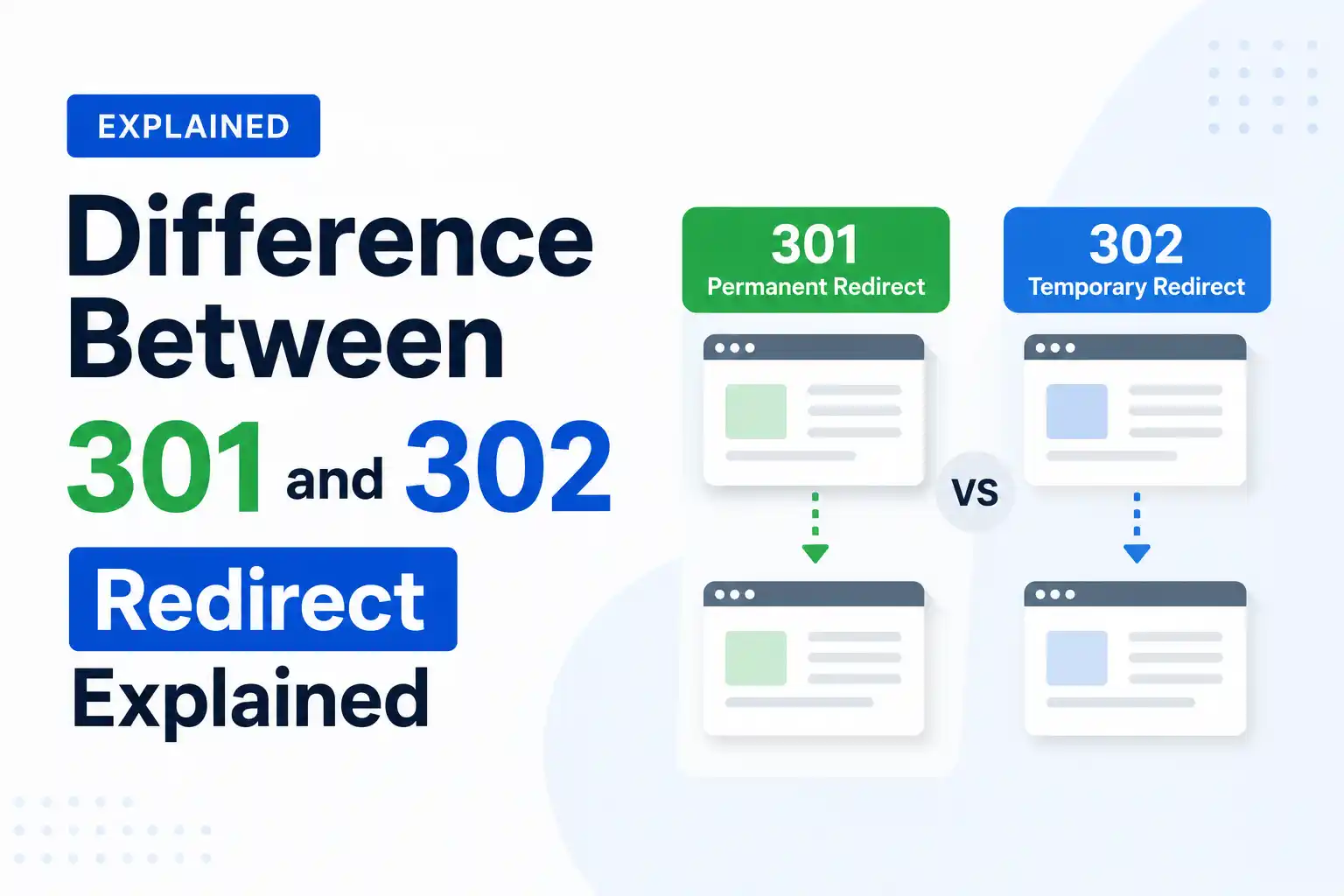
Understanding the difference between 301 and 302 redirects is important for both SEO and user experience. A 301 redirect tells search engines that a page has permanently moved to a new URL, helping transfer ranking signals and authority. In contrast, a 302 redirect indicates that the move is temporary and that the original URL may return. Choosing the correct redirect type ensures search engines handle your pages properly and helps preserve your website’s visibility in search results.
At 4P Wisdom, we see this mistake often. Businesses use the wrong redirect type. They lose link equity, rankings drop, and nobody knows why. Getting this right is not optional. It is a fundamental piece of technical SEO that directly affects your organic visibility.
This guide breaks down everything clearly. By the end, you will know exactly when to use each redirect type, why it matters for SEO, and how to protect your hard-earned rankings.
| 301 Redirect | 302 Redirect |
| Redirects users from one page to another | Redirects users from one page to another |
| Used for permanent redirects | Used for temporary redirects |
| Used on pages you want to retire | Used on pages you want to restore later |
| Often transfers search engine rankings (link equity) | Rarely transfers search engine rankings |
| Often cached by web browsers | Rarely cached by web browsers |
| Signals that the original URL has permanently moved | Signals that the original URL may return in the future |
| Typically used for website migration, page relocation, and page consolidation projects | Typically used for website tests, website maintenance, and temporary promotions |
| Preferred for long-term SEO changes | Preferred for short-term website changes |
| Search engines usually update their index to the new URL | Search engines usually keep the original URL indexed |
| Best for preserving SEO value after a URL change | Best for maintaining the original URL’s ranking signals temporarily |
What Is a Website Redirect?
A redirect is a server instruction to browsers and search engines. It says: “This URL has moved. Go here instead.” When someone clicks a link or types a URL, the server checks if a redirect exists. If yes, it sends the user to the new destination automatically.
Redirects are part of the HTTP status code system. These codes are three-digit numbers that tell browsers what happened with a request. The 3xx category specifically handles all redirection responses. Within this category, 301 and 302 are the two most commonly used codes in SEO.
Think of redirects like a change of address form at a post office. You tell the post office where you moved. They forward your mail accordingly. The key difference is whether the move is permanent or temporary.
What Is a 301 Redirect?
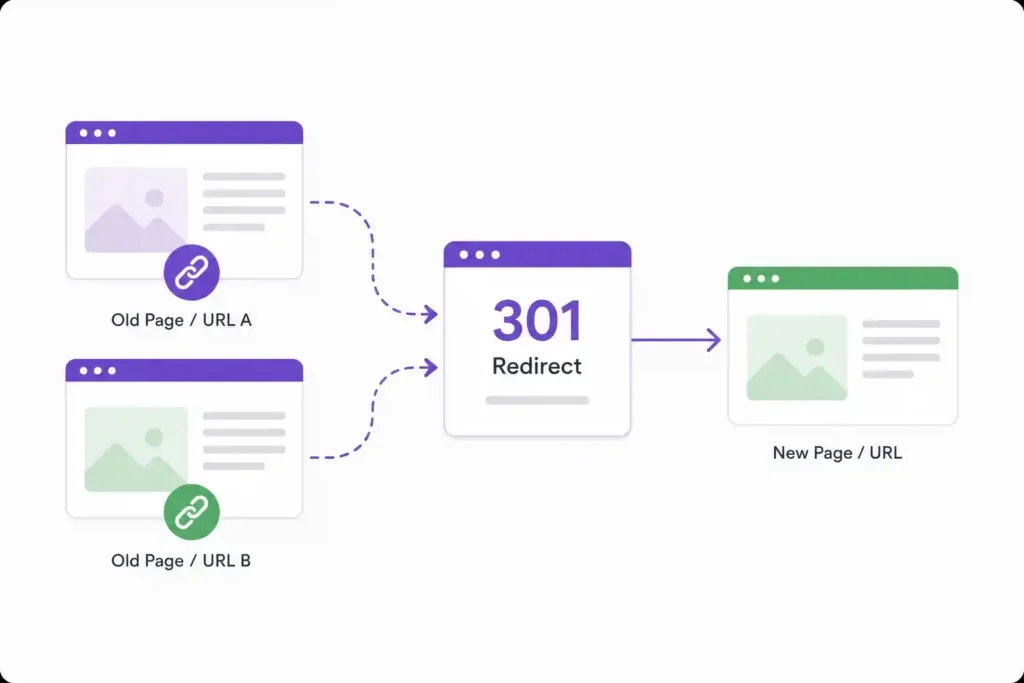
A 301 redirect is a permanent redirect. It tells both browsers and search engines that a page has moved to a new URL forever. The original page is gone for good and will not come back.
When Google’s crawler, Googlebot, encounters a 301 redirect, it understands the move is permanent. It begins the process of updating its index. Over time, typically within two to six months, the old URL gets replaced by the new one in search results.
More importantly, a 301 redirect passes link equity, also known as PageRank or link juice. Experts estimate this transfer to be around 90 to 99 percent. That means your backlinks, domain authority, and ranking power follow you to the new URL.
Common situations where you should use a 301 redirect include permanently deleting a page, launching a new domain during a rebrand, changing a URL structure for good, merging two websites into one, and switching from HTTP to HTTPS.
Browsers also cache 301 redirects aggressively. This makes them efficient and fast for returning visitors. However, it also means they are harder to undo later. Once Google indexes a 301, reversing course takes significant time and effort.
What Is a 302 Redirect?
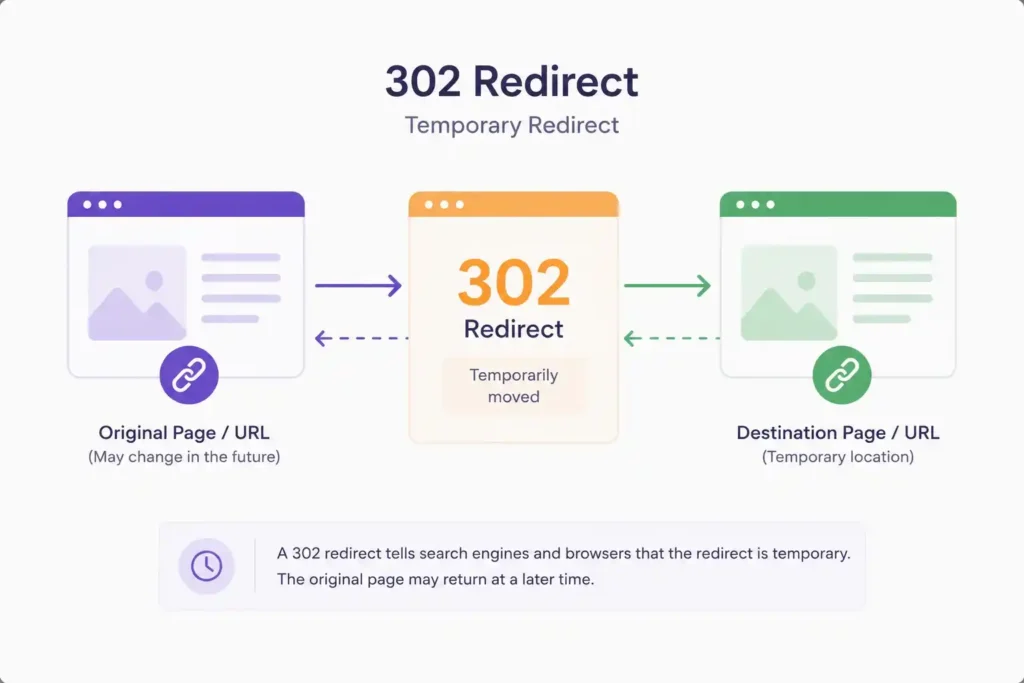
A 302 redirect is a temporary redirect. It tells browsers and search engines: “This page has moved, but only for now. Expect it to return.” The original URL is kept in Google’s index because the signal is temporary.
With a 302 redirect, Google does not fully transfer link equity to the destination URL. The original page retains its indexing status and authority. This is actually useful when you genuinely plan to bring the original URL back.
Browsers cache 302 redirects minimally, which makes them easy to change or remove. This flexibility is exactly why they exist.
Common situations where you should use a 302 redirect include running A/B tests on landing pages, redirecting users during site maintenance, testing a new design before making it permanent, creating seasonal campaign pages that will expire, and routing users to geo-specific content temporarily.
If you accidentally use a 302 when you meant to use a 301, you can end up with two pages competing in Google’s index. Your link equity stays split, and neither URL ranks as strongly as it should.
301 vs 302 Redirect: The Core Differences
Understanding the differences is where most people go wrong. Let us lay them out clearly.
Permanence
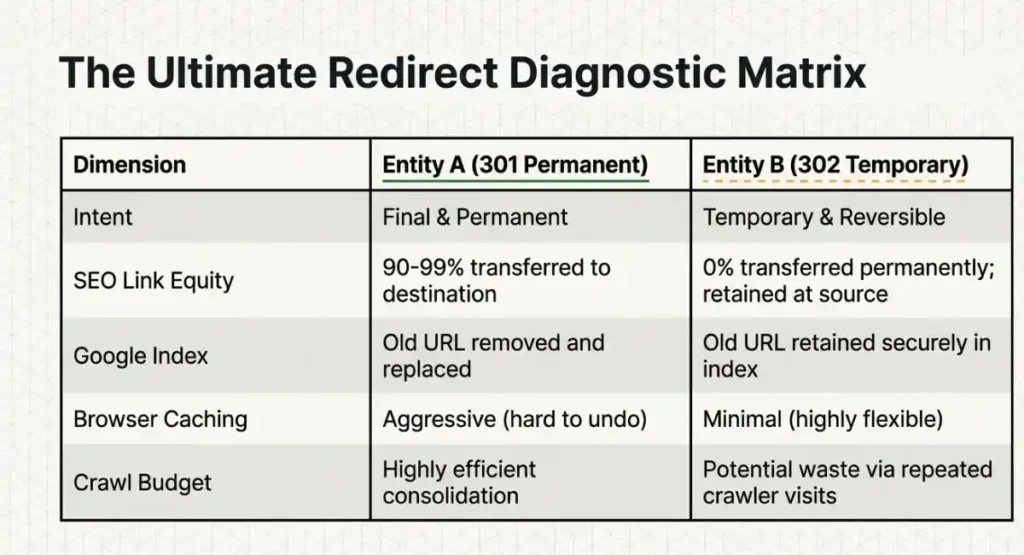
A 301 signals that the URL change is permanent and final. A 302 signals that the move is temporary and the original URL will return. This is the single most important distinction between the two.
SEO and Link Equity
When it comes to search engine optimization, 301 redirects transfer almost all of your link equity to the new URL. This keeps your rankings intact after a migration. A 302 redirect does not permanently pass link equity. The original page retains its authority.
Our SEO services always audit redirect chains before and after site migrations. Missing this step is one of the most costly technical SEO mistakes a business can make.
Google’s Indexing Behavior
With a 301, Google will eventually remove the old URL from its index and replace it with the new one. With a 302, Google keeps the original URL indexed because it expects the page to return. Using a 302 when you meant a 301 causes duplicate content issues and confuses search engines.
Browser Caching
Browsers cache 301 redirects heavily. Users who visited the old URL get served the cached redirect without hitting your server again. This is great for speed, but tricky if you ever need to reverse the redirect. Browsers cache 302 redirects lightly, giving you full flexibility to change or remove them anytime.
Crawl Budget Implications
For large websites with thousands of pages, crawl budget matters a lot. A 301 redirect consolidates signals to one URL, making crawling more efficient. A chain of 302 redirects can waste crawl budget since Google may keep visiting both the original and the destination URL repeatedly.
The One Question That Decides Everything
Before choosing between 301 and 302, ask yourself one simple question: Will the original URL ever serve content again?
If the answer is no, use a 301 redirect. If the answer is yes, use a 302 redirect. If you are truly unsure, default to 301. It is the safer choice for preserving your SEO value in most real-world scenarios.
Real-World Examples to Make This Crystal Clear
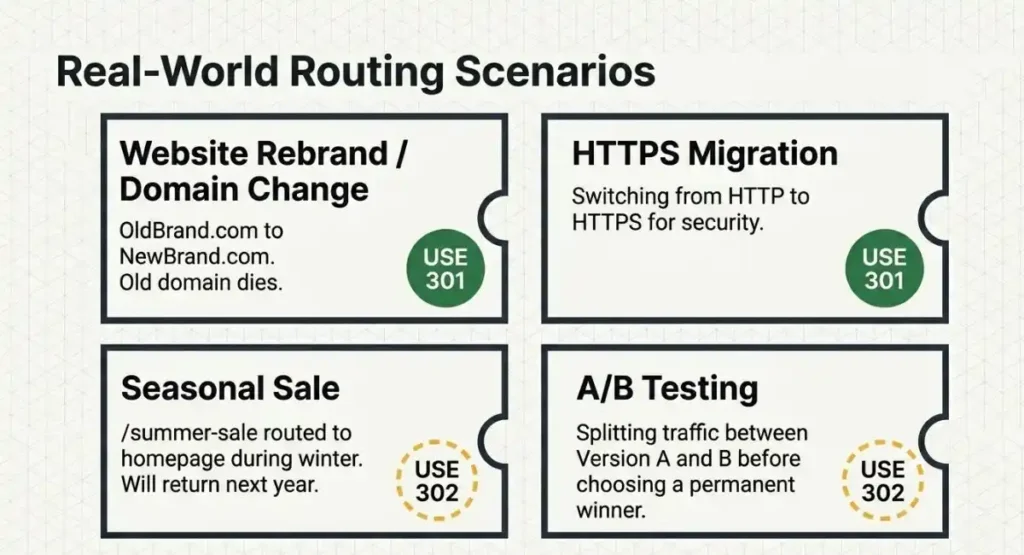
Example 1: Website Rebrand
Your company rebrands from “OldBrand.com” to “NewBrand.com.” The old domain will never be used again. Every page should have a 301 redirect pointing to the equivalent new page. This preserves your backlink profile, domain authority, and organic rankings.
Example 2: Seasonal Sale Page
You create a sale landing page at “/summer-sale” every year. During the off-season, you redirect it to your homepage. You plan to use that same URL again next summer. Use a 302 redirect here. Keep the original URL indexed so it retains its ranking power for next year.
Example 3: A/B Testing
You are running an A/B test on your product page. Half your visitors see version A and half see version B. Use 302 redirects so Google does not treat this as a permanent change. Once testing concludes, remove the redirect and implement the winning version permanently.
Example 4: HTTPS Migration
You switch your entire site from HTTP to HTTPS, which is a permanent and necessary change for security and SEO. Every HTTP URL should 301 redirect to its HTTPS equivalent. This consolidates authority and signals to Google that HTTPS is your canonical version going forward.
For businesses running paid campaigns and conversion optimization alongside organic SEO, understanding redirects is doubly important.
How 301 and 302 Redirects Affect Technical SEO
Technical SEO is the foundation of a high-ranking website. Redirects sit right at the heart of it. Here is how each type influences key technical factors.
Page Rank and Link Equity Flow
Google’s PageRank algorithm measures the authority of a page based on its backlinks. A 301 redirect allows almost all of that authority to flow to the destination URL. Over time, the new URL inherits the ranking power of the old one. A 302 does not trigger this permanent flow.
Canonicalization
Search engines use canonical signals to determine which version of a page to index. A 301 redirect is one of the strongest canonical signals you can send. It tells Google with certainty: this is the correct URL. A 302 is a weak or ambiguous signal that can create confusion in how Google handles canonicalization.
Redirect Chains and Loops
A redirect chain happens when URL A redirects to URL B, which redirects to URL C, and so on. Each hop in the chain loses a small percentage of link equity and slows down the user experience. Always audit your site for redirect chains. Whether using 301 or 302, keep chains to a minimum. Direct is always better.
A redirect loop, where URL A points to URL B and URL B points back to URL A, will cause a page to fail entirely. Browsers will throw an error and users will see nothing at all.
Our keyword research service at 4P Wisdom always maps out URL structures before any redirect implementation to avoid these costly errors.
Hreflang and International SEO
For websites targeting multiple countries or languages, redirect handling becomes even more complex. If you have hreflang tags set up for international targeting, make sure your 301 redirects properly account for locale-specific URLs. Misusing 302 redirects on international pages can leave the wrong URLs indexed in each regional Google Search.
301 Redirects and Local SEO
If you are a local business that has changed its address, phone number, or even its website URL, redirect management is critical. Local SEO relies heavily on consistent NAP data (Name, Address, Phone Number) across the web. But it also depends on consistent URL signals.
If your old website URL is mentioned across local business directories, review sites, and Google Business Profile, a 301 redirect ensures that any visitor or crawler following those links reaches your current site without losing authority.
Our local SEO service handles this as part of every local citation audit. Redirects from old domain names, old location pages, or old service pages are cleaned up and properly redirected so local rankings stay strong.
Common Mistakes to Avoid
Mistake 1: Using a 302 when you mean a 301. This is the most common error. It keeps your old URL indexed, dilutes your authority, and confuses search engines about which URL to rank.
Mistake 2: Creating long redirect chains. Every extra hop reduces the link equity passed and slows load time. Always redirect from the original URL directly to the final destination.
Mistake 3: Forgetting to update internal links. After redirecting pages, update your internal links to point directly to the new URL. Do not rely on redirects for internal navigation.
Mistake 4: Not redirecting old backlinks. If you change your URL structure but forget to redirect pages that have strong backlinks, you lose that link equity completely.
Mistake 5: Deleting pages without redirects. A page with backlinks or organic traffic should never simply return a 404 error. Always redirect it to a relevant existing page.
Mistake 6: Redirecting everything to the homepage. This is called a soft 404 in Google’s eyes. If you cannot find a relevant destination, it is sometimes better to let the page 404 honestly than to send all deleted pages to the homepage.
Strong content strategy paired with proper technical implementation is what separates good SEO from great SEO. Our content marketing services ensure your content architecture and URL structures are built for long-term ranking success from day one.
How to Implement a 301 or 302 Redirect
On Apache Servers
For a 301 redirect, add this to your .htaccess file: Redirect 301 /old-page /new-page
For a 302 redirect, replace 301 with 302 in the same format.
On Nginx Servers
For a permanent 301 redirect, use the return directive: return 301 /new-page;
For a temporary 302 redirect, replace 301 with 302.
In WordPress
WordPress plugins like Rank Math or Yoast SEO have built-in redirect managers. You can set both 301 and 302 redirects directly from your dashboard without touching server configuration files.
In Shopify
Shopify has a native URL redirect feature under Online Store settings. All redirects in Shopify are treated as 301 by default. For temporary campaigns, you may need a custom app or a third-party redirect solution to implement a true 302 response.
Using JavaScript
Avoid using JavaScript for redirects whenever possible. Google can process JavaScript, but it introduces delays in the crawl process. Server-side redirects are always faster and more reliable for SEO purposes.
According to Google’s own documentation, server-side 301 redirects are the preferred method for all permanent URL changes, as they pass the strongest signals and are processed most reliably by all search engine crawlers.
301 vs 302 Redirects: A Quick Summary
A 301 redirect means the move is permanent, link equity transfers fully, the old URL leaves Google’s index, and browser caching is aggressive. Use it for rebrands, migrations, HTTPS upgrades, and permanent URL changes.
A 302 redirect means the move is temporary, link equity does not permanently transfer, the old URL stays in Google’s index, and browser caching is minimal. Use it for A/B tests, seasonal pages, maintenance, and geographic routing tests.
When in doubt, choose 301. It is the safer default for protecting your SEO equity in most real-world scenarios.
Frequently Asked Questions
Does a 301 redirect pass 100% of link equity?
No, not exactly 100%. Research and SEO experts generally estimate that a 301 redirect passes around 90 to 99 percent of the original page’s link equity. There is always a minor loss during the transfer. However, it is by far the best way to preserve your rankings and authority when permanently moving a page or domain.
Can I change a 301 redirect to a 302 later?
Technically yes, but it is difficult and time-consuming. Browsers aggressively cache 301 redirects. Users who visited the original URL may still be served the cached version for weeks or months. For this reason, always be certain that a change is permanent before implementing a 301.
Is a 302 redirect bad for SEO?
Not at all, when used correctly. A 302 redirect is perfectly fine for genuinely temporary situations like A/B tests, seasonal campaigns, or maintenance windows. The problem only arises when a 302 is used in situations that are actually permanent. That is when SEO suffers.
How long does Google take to process a 301 redirect?
Google typically processes and indexes 301 redirects within a few days to a few weeks. However, fully removing the old URL from its index and passing all authority to the new one can take anywhere from two to six months, depending on how often your site is crawled and how strong your domain authority is.
What happens if I delete a page and do not add any redirect?
Without a redirect, the deleted page returns a 404 error. Any backlinks pointing to that URL lose their value completely. Any user clicking an old link lands on an error page. If the deleted page had significant traffic or backlinks, always redirect it to the most relevant existing page on your site.
Do 301 redirects affect page speed?
Every redirect adds a small amount of latency because the browser must complete an additional HTTP request. For most users, this delay is negligible. However, redirect chains (multiple consecutive redirects) can noticeably slow down page load times. Google’s Core Web Vitals measure page speed as a ranking factor, so keep redirects direct and avoid unnecessary chains.
Leave a Reply