If you want your website to rank higher on Google, internal linking is one of the most powerful tools you have. Yet most website owners completely ignore it.
In this guide, you will learn everything about the internal linking strategy. We will cover what it is, why it matters, and exactly how to do it right. Whether you are a beginner or an experienced SEO professional, this guide will help you build a smarter website structure that Google loves.
Let us get started.
What Is Internal Linking in SEO?
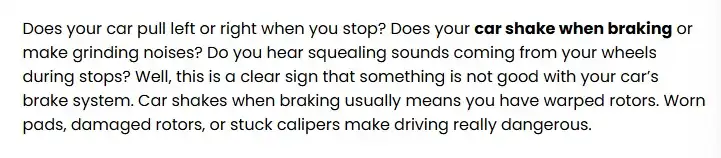
An internal link is a hyperlink that connects one page on your website to another page on the same website. When you click on a link within a blog post that takes you to another blog post or service page, that is an internal link.
Here is a simple example. Imagine you run a digital marketing website. You write a blog post about SEO basics. Inside that post, you link to your dedicated SEO services page. That connection between those two pages is an internal link.
Internal links are different from external links, which point to pages on other websites. Internal links keep your visitors exploring within your own domain.
Here is the sample code of the internal link
href=https://wisecarcare.com/why-your-car-shakes-when-braking/”><b>car shake when braking</b></a>
Internal Links vs External Links: What Is the Difference?
Understanding the difference helps you use both strategically.
Internal links connect pages within the same website. They pass authority between your own pages, help search engines discover your content, and guide users deeper into your site.
External links point from your website to another website. They help build credibility when you cite trusted sources. According to Google’s Search Essentials documentation, linking to high-quality external sources can actually strengthen your content’s trustworthiness.
Both types of links matter for SEO. But internal links are fully within your control. That makes them a massive opportunity.
| Feature | Internal Links | External Links |
| Definition | Link to another page on the same website. | Link to a page on a different website. |
| Purpose | Improve navigation and site structure. | Provide additional information or references. |
| SEO Impact | Helps distribute authority across pages. | Supports content credibility and relevance. |
| Domain | Stays within the same domain. | Points to a different domain. |
| User Experience | Keeps users on your website. | Directs users to external resources. |
| Crawlability | Helps search engines discover pages. | Helps search engines understand content context. |
| Control | Fully controlled by your website. | Depends on an external website. |
| Link Equity | Shares authority within the site. | Can pass authority to another site. |
Why Is Internal Linking Important for SEO?
Internal linking is not just a nice-to-have feature. It is a core part of how Google understands your website. Here is why it matters so much.
1. Internal Links Help Google Discover and Crawl Your Pages
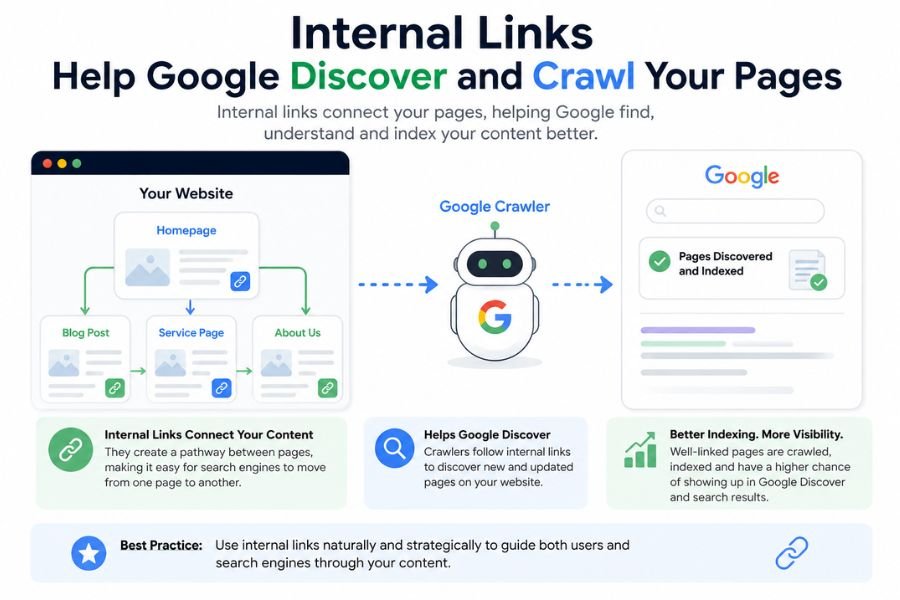
Google uses web crawlers called Googlebots to discover and index web pages. These crawlers follow links from one page to the next. If a page on your site has no internal links pointing to it, Googlebot may never find it.
This is especially critical for new content. When you publish a new blog post, adding internal links to it from existing pages tells Google to crawl and index it faster.
Think of internal links as road signs. Without them, Google’s crawler gets lost on your website.
2. Internal Links Distribute Page Rank and Link Authority
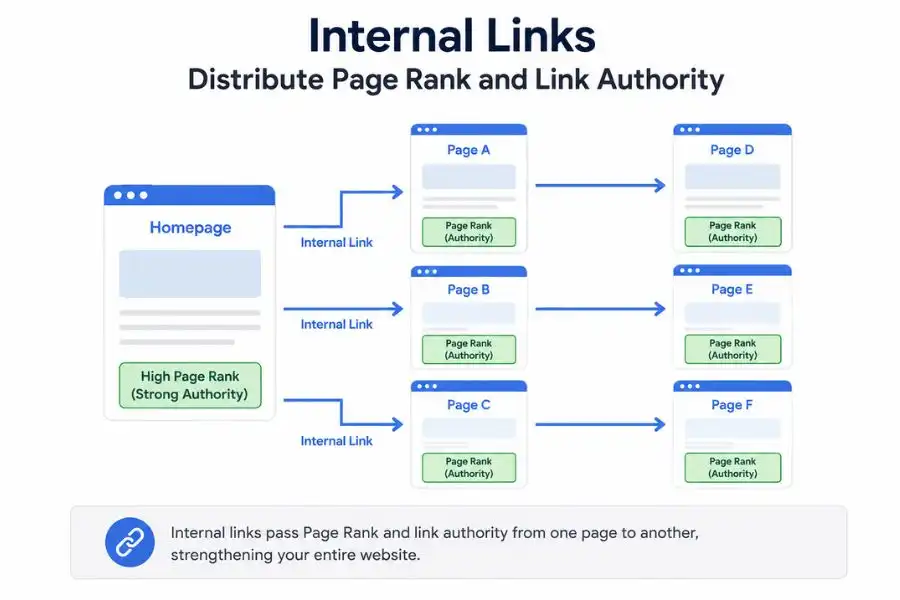
PageRank is Google’s way of measuring how authoritative a page is. Pages that have many high-quality backlinks from other websites carry more authority.
Here is the powerful part. When you internally link from a high-authority page to a lower-authority page, you pass some of that authority along. This is called link equity or link juice.
For example, if your homepage has dozens of backlinks from other websites, it has strong authority. Linking from your homepage to a new blog post gives that blog post a strong authority boost. This helps it rank higher on Google Search results pages (SERPs).
At 4P Wisdom, this is one of the first tactics we use when building an SEO strategy for a new client. It is simple, free, and incredibly effective.
3. Internal Links Improve User Experience and Engagement
When users land on your page, you want them to stay and explore. Internal links guide visitors to related content they will find useful. This keeps people on your website longer.
Google tracks something called dwell time, which is how long users spend on your website. Longer dwell time sends a positive signal to Google. It tells the algorithm that your content is valuable and relevant.
A well-structured internal linking strategy turns a single-page visit into a full website exploration. That is good for users and great for your rankings.
4. Internal Links Establish Topical Authority
Google no longer ranks websites based on keywords alone. It evaluates topical authority, which means how thoroughly your website covers a specific subject. If your website has dozens of pages all about digital marketing, all linked together intelligently, Google recognizes you as an authority on that topic.
Internal linking creates that web of relevance. It tells Google that your website is a comprehensive resource, not just a collection of unrelated pages.
Types of Internal Links You Should Know
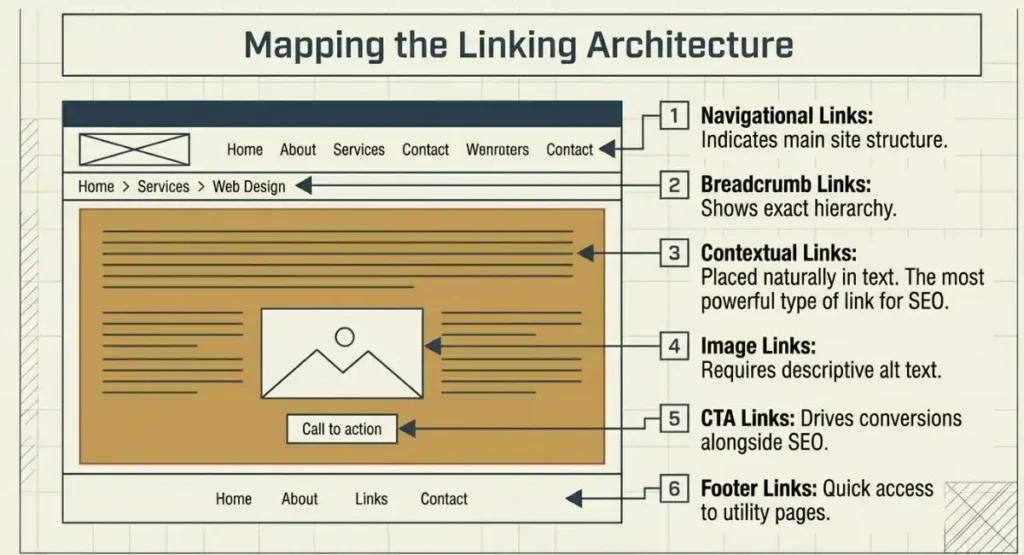
Not all internal links are the same. Understanding each type helps you place them strategically. Internal links can serve a variety of functions across a website. The most common types include:
- Contextual links – Placed naturally within page content to connect related topics and provide additional value.
- Navigational links – Found in primary menus, headers, or sidebars to help users move between key sections of a site.
- Image links – Clickable images that direct users to other pages or resources.
- Footer links – Located in the website footer, offering quick access to important pages and information.
- Sidebar links – Displayed in sidebars to highlight relevant content, categories, or resources.
- Breadcrumb links – Indicate a page’s position within the website structure, making navigation easier.
- In-content call-to-action (CTA) links – Embedded within content to encourage users to take a specific action, such as signing up, downloading a resource, or making a purchase.
Contextual Links
Contextual links appear inside the body text of your blog posts and web pages. These are the most powerful type of internal links because they appear within relevant content. Search engines give contextual links the most weight.
For example, if you are writing about content marketing and you link to your content marketing services page, that is a perfect contextual link. It is relevant, natural, and useful.
Navigational Links

Navigational links appear in your website’s main menu, sidebar, or top navigation bar. These links help users and search engines understand your site’s main structure. Your most important pages should always appear in navigation.
Footer Links
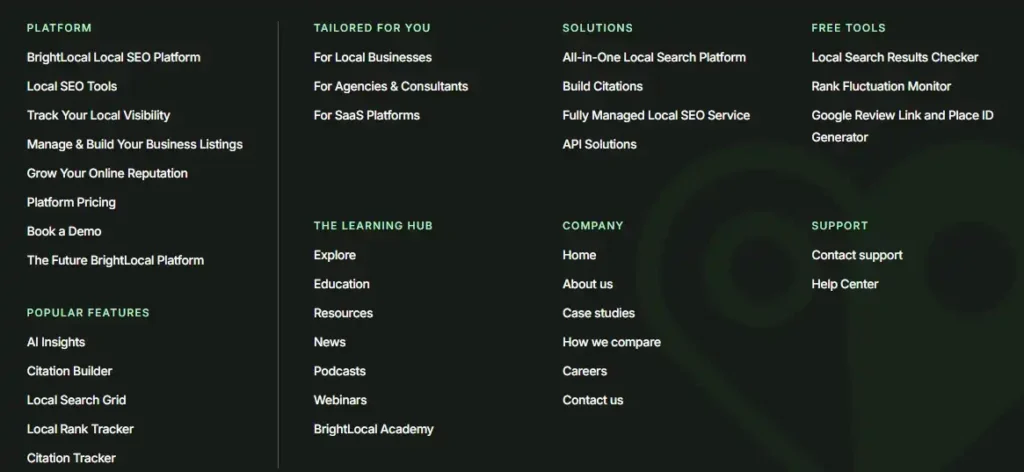
Footer links appear at the bottom of every page on your website. They give users quick access to important pages like contact, services, or privacy policy. While not as powerful as contextual links, footer links still contribute to your overall site architecture.
Breadcrumb Links

Breadcrumb links show users exactly where they are within your site hierarchy. A breadcrumb might look like: Home / Blog / SEO / Internal Linking Guide. They improve both user experience and site structure.
Image Links
When you link an image to another page on your website, that is an image link. Make sure you use descriptive alt text for image links so search engines understand where they lead.
CTA Links
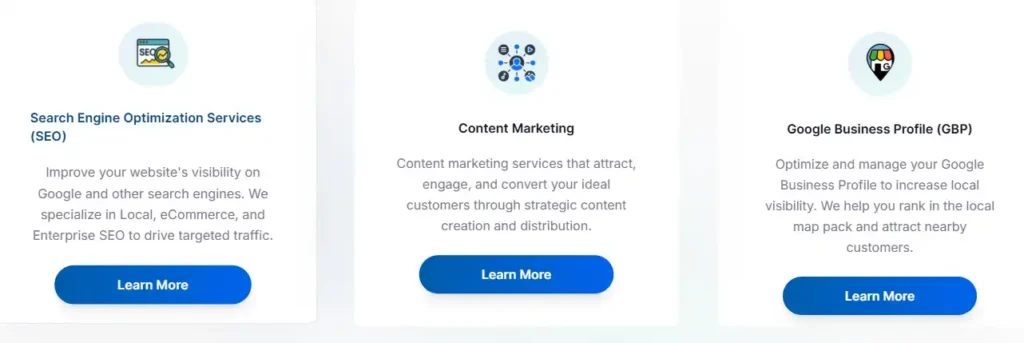
Call-to-action links are designed to convert visitors. They might say something like “Learn more about our SEO services” and link to a service page. These links serve both SEO and business goals simultaneously.
How to Build a Winning Internal Linking Strategy Step by Step
Now, let us get into the actual process. Here is the step-by-step internal linking strategy we use at 4P Wisdom for our clients.
Step 1: Build a Clear Site Architecture First
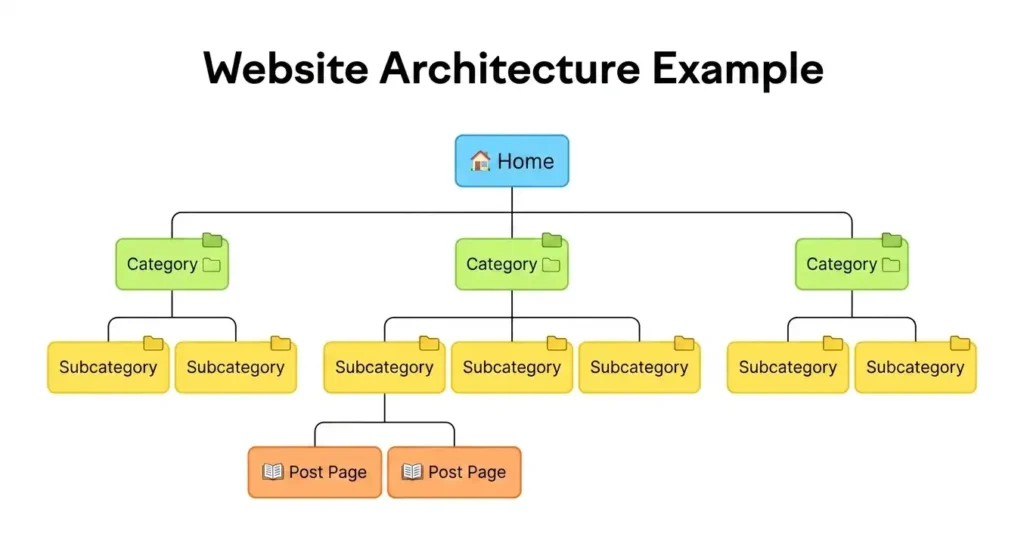
Before you start linking pages together, you need a clear map of your website’s structure. Think of your site like a pyramid.
At the very top sits your homepage. Below it are your main category pages or pillar pages. Below those are your supporting blog posts and cluster content pages. Every layer connects to the ones above it.
A clean pyramid structure ensures that authority flows from the top down. It also ensures that no page is more than three clicks away from the homepage. Google considers pages that are close to the homepage as more important.
A shallow site architecture is always better than a deep, complicated one.
Step 2: Identify Your Pillar Pages
A pillar page is a comprehensive, authoritative piece of content that covers a broad topic in depth. It acts as the central hub for all related content on your website.
For example, if your website is about digital marketing, one pillar page might be titled “The Complete Guide to SEO.” That page would then link out to multiple cluster pages covering specific subtopics like keyword research, on-page SEO, technical SEO, and link building.
Your pillar pages should target broad, high-volume keywords. They should be the most thorough pages on your website for that topic. Pillar pages attract backlinks naturally because they are genuinely useful resources.
Step 3: Create Topic Clusters Around Your Pillars
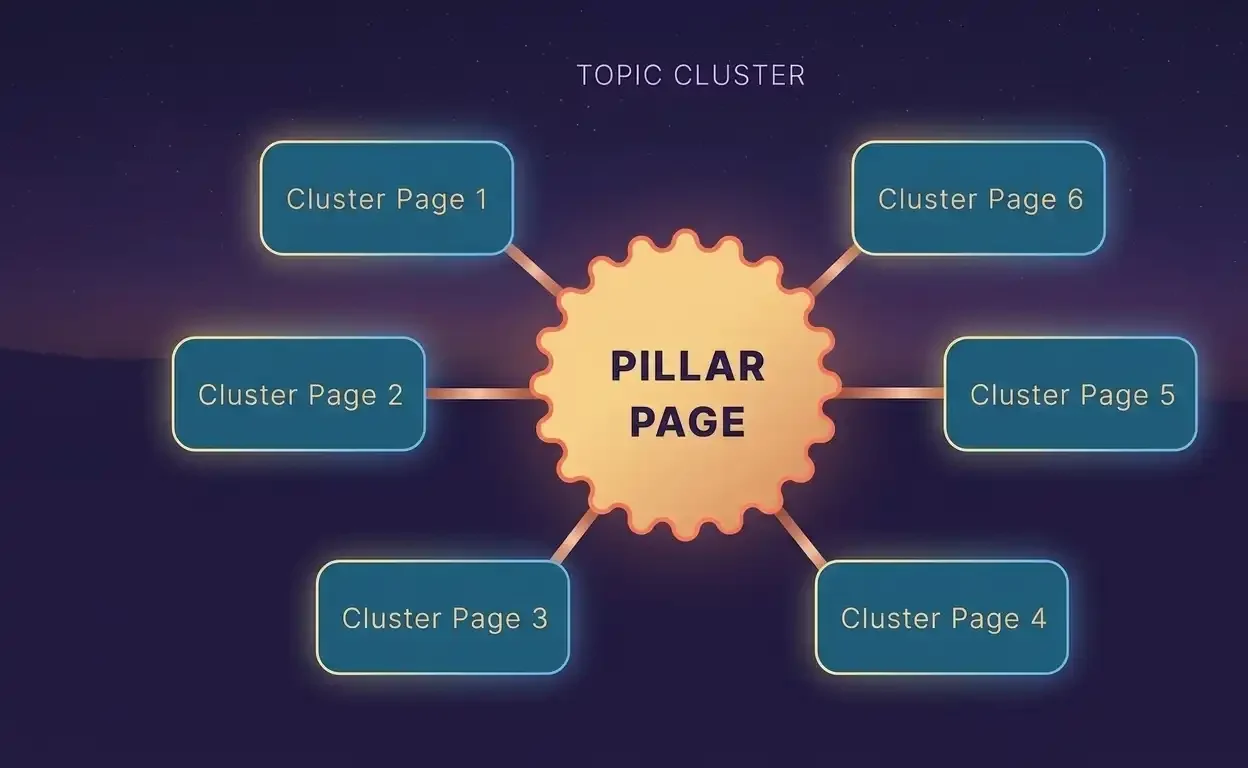
A topic cluster is a group of interlinked pages that all revolve around one central pillar page. Each cluster page covers a more specific subtopic related to the pillar.
Here is a practical example. Your pillar page is about SEO. Your cluster pages might include:
Keyword research for beginners. Local SEO strategy. On-page optimization checklist. Technical SEO audit guide. Internal linking strategy.
Each cluster page links back to the pillar page. The pillar page also links out to each cluster page. This creates a tight web of relevance that Google absolutely loves.
Topic clusters are one of the biggest internal linking strategies you can use today. They signal topical authority and help all the pages in the cluster rank better collectively.
If you need help building a keyword strategy and topic cluster structure, our keyword research services can help you map it all out.
Step 4: Use Your Highest Authority Pages to Pass Link Equity
Not all your pages carry equal authority. Some pages have earned many backlinks from other websites. These pages are your most powerful assets.
Here is the strategy. Go to your analytics or SEO tool and identify which pages have the most referring domains pointing to them. Those are your highest authority pages. Now look for opportunities to add internal links from those pages to newer or weaker pages you want to rank higher.
This process is called sculpting link equity. You are deliberately directing the flow of authority across your website. It is one of the most advanced and effective internal linking tactics available.
Always link from strong pages to pages you want to rank higher. Do not waste those high-authority pages by only linking to already popular content.
Step 5: Optimize Your Anchor Text Carefully
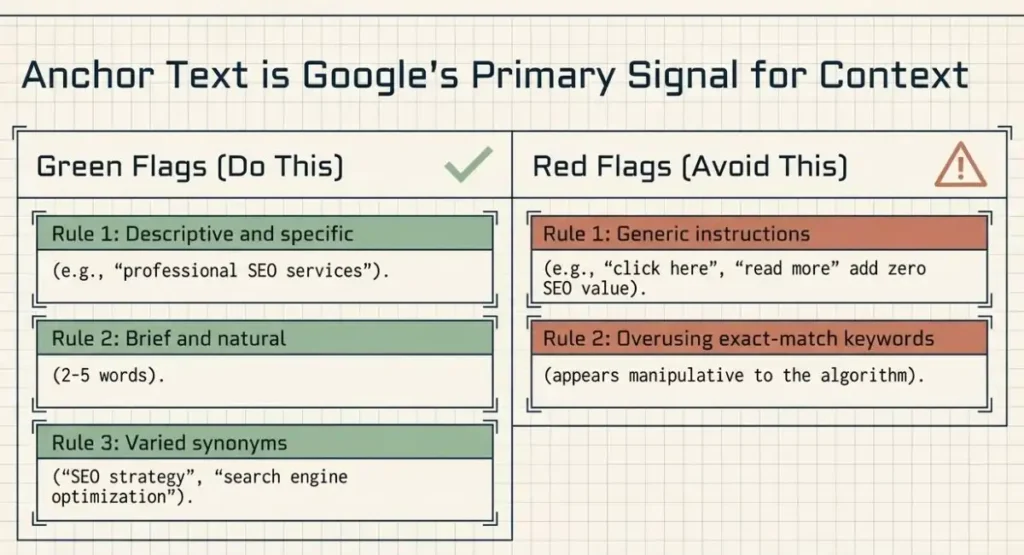
Anchor text is the clickable, highlighted text that contains a hyperlink. It is one of the most important signals Google uses to understand what the linked page is about.
Good anchor text should be:
Descriptive and specific. If you are linking to an SEO services page, use anchor text like “professional SEO services” rather than just “click here.”
Brief and natural. Keep anchor text between two and five words. It should flow naturally within the surrounding sentence.
Varied but relevant. Avoid using the exact same anchor text for every link to the same page. Use natural variations like “SEO strategy,” “search engine optimization services,” or “SEO experts.”
Never use vague phrases like “read more,” “learn here,” or “this page.” Those phrases tell Google and users absolutely nothing about where the link leads.
Anchor text optimization is a subtle but powerful technique. At 4P Wisdom, we treat anchor text as part of the broader SEO services strategy for every client website we manage.
Step 6: Find and Fix Orphan Pages Immediately
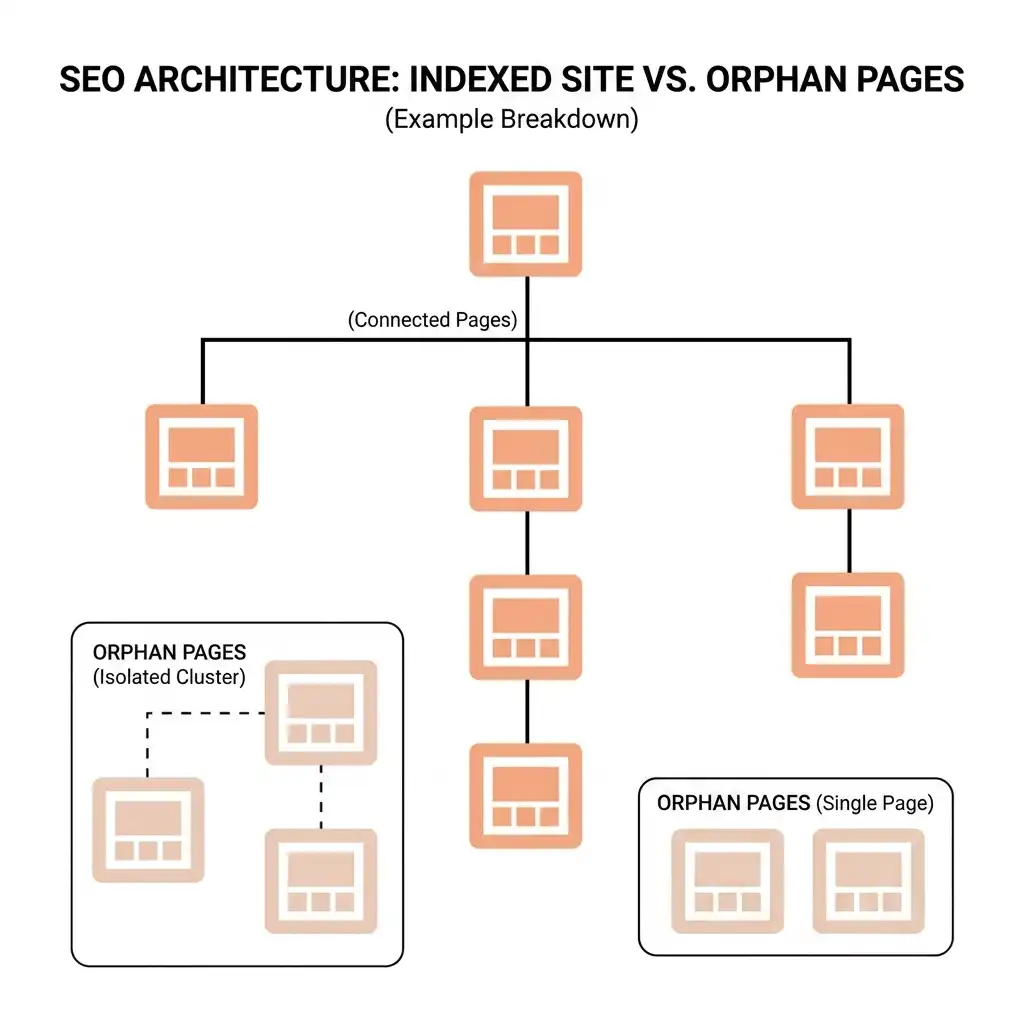
An orphan page is a page on your website that has zero internal links pointing to it. Google’s crawlers cannot find orphan pages because there are no links leading to them. As a result, orphan pages almost never rank on Google.
Every single page on your website should have at least two or three internal links pointing to it. If you publish a new blog post and never link to it from anywhere else on your site, it is essentially invisible.
Use a site audit tool to scan for orphan pages regularly. When you find them, go back to your existing content and add relevant internal links pointing to those orphaned pages.
Step 7: Reduce Crawl Depth to Three Clicks Maximum
Crawl depth refers to how many clicks it takes to reach a specific page starting from the homepage. A page that requires five or six clicks to reach is very deep within your site hierarchy.
According to Google, the fewer clicks it takes to reach a page, the more important that page appears. Keep all important pages within three clicks of the homepage. If you have important content buried deeply within your site, create shortcuts to it through internal links on higher-level pages.
This is especially important for e-commerce websites with large product catalogs and for content websites with hundreds of blog posts.
Step 8: Add Internal Links to Every New Piece of Content
Whenever you publish new content, immediately go back and find at least three to five existing pages where you can add a link to the new content. This practice ensures every new page enters your site structure connected and discoverable.
The fastest way to find linking opportunities is to search Google using the following format: site:yourwebsite.com “target keyword.” This shows you all the pages on your site that mention that topic. Those are your best candidates for adding an internal link.
For instance, if you just published a guide on local SEO, you would search your site for pages mentioning “local SEO” or “local search” and add internal links from those pages to the new guide. Our local SEO services page is a great example of a page that deserves strong internal links from blog content covering local search topics.
Common Internal Linking Mistakes to Avoid
Even experienced SEOs make these mistakes. Learn them so you can avoid them.
Using Too Many Internal Links on One Page
More is not always better with internal links. If you cram dozens of links into a single blog post, you dilute the value passed to each link. Google divides the authority of a page equally among all outgoing links. Too many links mean each link gets very little power.
Keep your internal links focused and purposeful. Every link should serve a real reason, either helping the user or passing relevant authority.
Using Generic Anchor Text
Never use phrases like “click here” or “read more.” These add no SEO value. Always use descriptive anchor text that tells both users and Google exactly where the link leads.
Linking Only in One Direction
Many websites only link downward, from pillar pages to cluster pages. But linking upward, from cluster pages back to pillar pages, is equally important. Bidirectional linking reinforces topical relevance and strengthens the entire cluster.
Ignoring Broken Internal Links
Broken internal links lead to 404 error pages. They waste crawl budget, frustrate users, and pass zero link equity. Run a site audit at least once per month to identify and fix broken internal links quickly.
Overusing Exact Match Anchor Text
While keyword-rich anchor text is good, using the exact same keyword phrase in every internal link can appear manipulative to Google. Use natural variations and synonyms to keep your internal linking looking organic.
Not Updating Old Content with New Internal Links
As you publish new content, always revisit your older posts and pages. Look for opportunities to add fresh internal links that point to your newer content. Old content often has strong authority built up over time. Linking from it to new content gives that new content a powerful boost.
Internal Linking for Different Types of Websites
Internal linking strategy looks different depending on what type of website you run. Here is how to approach it for the most common types.
Internal Linking for Blogs
Blogs benefit enormously from topic clusters and pillar pages. Group related blog posts together under a central pillar post. Link all related posts back to the pillar and link the pillar out to each related post. This structure helps you rank for competitive topics faster.
Also, focus on linking from your most popular and highest traffic blog posts. When you add internal links from posts that already get thousands of monthly visitors, you pass significant authority to the linked pages.
Internal Linking for E-Commerce Websites
E-commerce sites have unique internal linking challenges due to their large size. Here are the key priorities for online stores:
Link from category pages to product pages. Link from product pages to related product pages. Use “you might also like” sections to create automatic internal linking. Link from blog content to relevant product and category pages.
E-commerce internal linking is directly tied to revenue. When users can easily navigate from one product to related products, conversion rates improve alongside rankings. Pairing smart internal linking with a strong performance marketing strategy amplifies results even further.
Internal Linking for Service-Based Websites
For agencies, consultants, and service providers, internal linking should connect blog content to service pages consistently. Every blog post you publish should have at least one or two links to a relevant service page.
This serves two purposes. First, it passes SEO authority to your money pages. Second, it converts blog readers into potential clients by guiding them toward your services at the right moment.
.
How to Perform an Internal Link Audit
Before you build a new internal linking strategy, you need to understand your current situation. An internal link audit reveals problems that may be hurting your rankings right now.
Here is what to look for during your audit.
Check for Broken Internal Links
A broken internal link points to a page that no longer exists. These create 404 error pages, waste crawl budget, and damage user experience. Use any site audit tool to crawl your website and identify all broken internal links. Fix them by updating the link to point to the correct, live page or by removing the link entirely.
Find Orphan Pages
As discussed earlier, orphan pages have no internal links pointing to them. Run a crawl audit and cross-reference with your sitemap. Any page that appears in your sitemap but has no internal links pointing to it is an orphan page. Add relevant internal links to these pages immediately.
Review Pages with Only One Internal Link
A page with only one internal link is nearly invisible to Google. It has very little authority and is unlikely to rank for competitive keywords. Find these pages and add more internal links pointing to them from relevant content across your site.
Check Your Crawl Depth
Identify which pages are more than three clicks away from the homepage. These deep pages are given less priority by Google. Flatten your site architecture by adding internal links to these deep pages from shallower, high-level pages.
Look for Nofollow Attributes on Internal Links
The nofollow attribute tells Google not to pass link authority through a link. This attribute makes sense for external links you do not want to endorse. But for internal links, you almost always want authority to flow freely. Check your internal links for nofollow attributes and remove them unless there is a specific reason to keep them.
Fix Internal Redirect Chains
A redirect chain occurs when an internal link points to URL A, which redirects to URL B, which redirects to URL C. Each redirect step loses a small percentage of link equity. Always update internal links to point directly to the final destination URL. This preserves full link authority and improves page speed.
Advanced Internal Linking Strategies for Maximum SEO Impact
Once you have the basics in place, these advanced strategies will separate you from the competition.
The Hub and Spoke Model
The hub and spoke model is the most effective site architecture for topical authority. One central hub page covers a broad topic comprehensively. Multiple spoke pages cover specific subtopics in detail. Every spoke links back to the hub. The hub links out to every spoke.
This model creates an incredibly tight content ecosystem. Google sees the hub as a definitive authority on the broad topic. The spokes rank for more specific long-tail keywords. The entire cluster benefits from the combined authority.
Strategic Silo Structure
Content silos group related pages together into isolated topic sections. Pages within a silo link primarily to other pages within the same silo. This keeps topical relevance tightly concentrated.
For example, all your pages about local SEO would link mostly to each other. All your pages about content marketing would link mostly to each other. Cross-silo linking happens occasionally but is not the primary focus.
Silos are particularly powerful for large websites covering multiple distinct topics.
Leverage Your Most Trafficked Pages
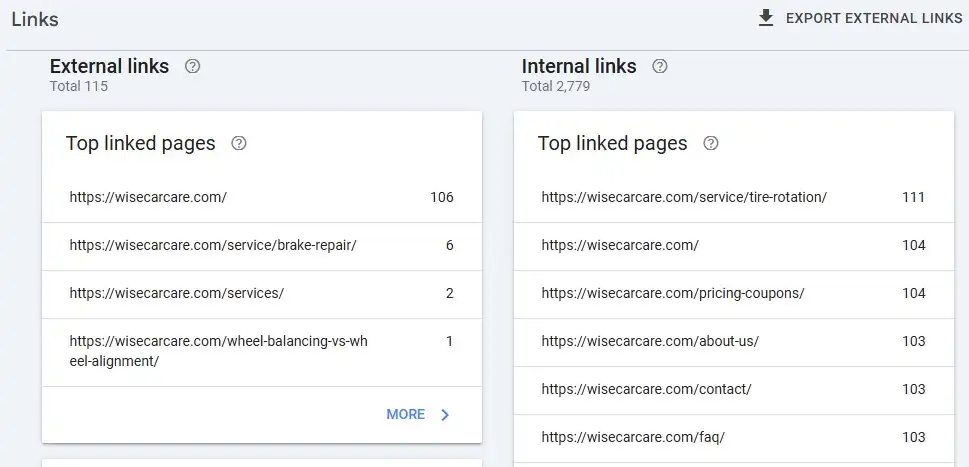
Use Google Analytics or Search Console to identify which pages on your site receive the most organic traffic. These high-traffic pages are incredibly valuable real estate for internal links.
Add internal links from your most trafficked pages to the pages you most want to rank. Even a single internal link from a page receiving 10,000 monthly visitors can make a significant difference to a newer page’s authority.
Use Related Posts Widgets Carefully
Many CMS platforms, like WordPress, allow you to automatically display related posts at the bottom of every blog post. These are internal links. However, be selective about how you configure them. Make sure they genuinely link to relevant, topically related content. Irrelevant automatic links add noise without adding value.
Internal Linking During Content Refreshes
Whenever you refresh or update an old piece of content, review its internal links at the same time. Old posts sometimes link to outdated pages or miss opportunities to link to newer content. A content refresh is the perfect moment to strengthen your internal linking network and keep authority flowing to your most current material.
Our content marketing services include regular content refreshes as a core deliverable, partly because they are one of the most efficient ways to boost SEO without creating new content from scratch.
Internal Linking and Google’s E-E-A-T Guidelines
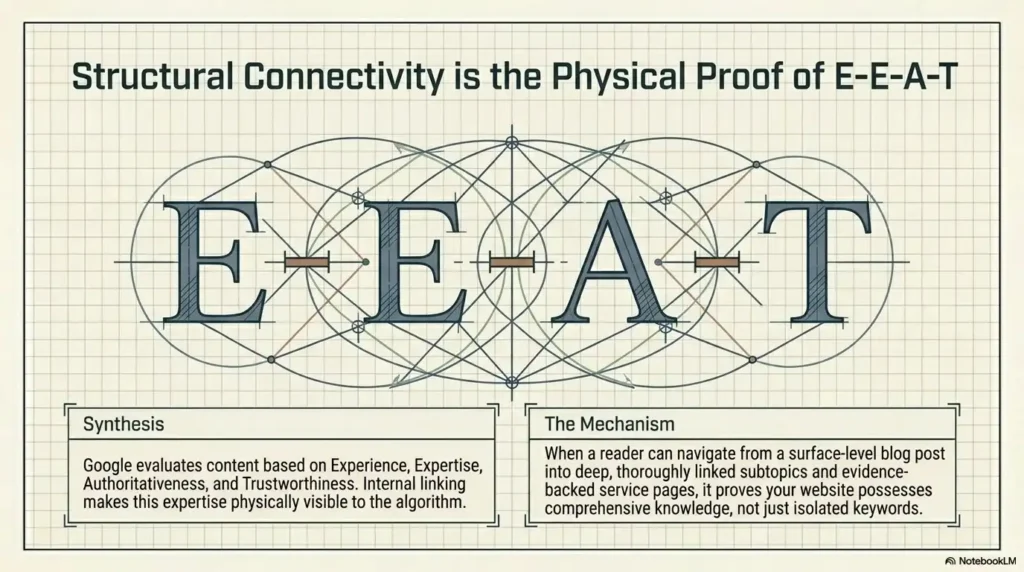
Google evaluates content based on Experience, Expertise, Authoritativeness, and Trustworthiness, commonly known as E-E-A-T. Internal linking plays a direct role in how well your website demonstrates these qualities.
When your website has a clear, well-organized internal linking structure, it makes expertise visible. A reader who lands on your blog post can easily navigate to deeper, more detailed content on the same topic. This demonstrates that your website has comprehensive knowledge, not just surface-level content.
Internal links that guide users toward expert-level pages, authoritative resources, and evidence-backed service pages all contribute to E-E-A-T signals.
Linking to well-established external authorities like Google Search Central or Moz, combined with strong internal linking, creates a balanced content ecosystem that aligns with what Google considers trustworthy content.
How Many Internal Links Should a Page Have?
This is one of the most common questions about internal linking strategy. There is no perfect universal number. The right number depends on the length and purpose of your content.
A general guideline is to include one internal link for every 300 to 500 words of content. A 2000-word blog post might naturally contain four to six contextual internal links. A longer, comprehensive guide like this one might include eight to twelve.
The most important rule is this: every internal link must be genuinely relevant and useful. Do not force links where they do not belong just to hit a number. Unnatural linking can hurt user experience and may look manipulative to search engines.
Internal Linking Tools and Resources
Several tools can help you manage and optimize your internal linking strategy effectively.
Google Search Console is free and shows you which pages are indexed and how Google is crawling your site. It also highlights crawl errors, which often include broken internal links.
Screaming Frog SEO Spider is a powerful crawl tool that maps all the internal links on your website. It shows you exactly which pages link to which, helping you identify orphan pages, broken links, and redirect chains.
Ahrefs and SEMrush both offer site audit features that analyze your internal link structure. They show link equity distribution, crawl depth, and linking opportunities.
Yoast SEO plugin for WordPress includes an internal linking suggestions feature that recommends relevant posts to link to as you write. It makes on-the-go internal linking much faster.
Frequently Asked Questions About Internal Linking Strategy
Does Internal Linking Directly Improve Google Rankings?
Yes. Internal linking directly influences how Google discovers, crawls, and ranks your pages. Pages with more internal links pointing to them tend to rank higher than pages with few or none. Additionally, strategic anchor text in internal links helps Google understand the topical relevance of your pages.
How Often Should I Review My Internal Links?
Conduct a full internal link audit at least once every three months. However, actively adding new internal links should be an ongoing, weekly practice. Every time you publish new content, add internal links to and from it on the same day.
Should I Use Exact Match Keywords in Anchor Text?
Using exact match keywords in internal link anchor text is acceptable and helpful. Unlike external links, where Google is stricter about anchor text manipulation, internal links with keyword-rich anchor text are generally considered natural and beneficial for SEO.
What Is the Best Internal Link Structure for a Small Website?
For small websites with fewer than 50 pages, a flat structure works best. Every page should be reachable from the homepage in just one or two clicks. Link your most important pages from the homepage directly and link related posts to each other with contextual links.
Can Too Many Internal Links Hurt SEO?
Yes, excessive internal links on a single page can dilute link equity and confuse users. Keep links focused and meaningful. A page packed with dozens of links to unrelated content is poor user experience and signals low quality to Google.
Final Thoughts: Start Building Your Internal Linking Strategy Today
Internal linking is one of the highest-return, lowest-cost SEO tactics available to any website owner. You do not need a budget to implement it. You just need a strategy, consistency, and a clear understanding of how your content connects.
Start with your site architecture. Identify your pillar pages. Build your topic clusters. Add contextual links to every piece of content you publish. Fix orphan pages. Optimize your anchor text. Review your internal links regularly.
Done consistently, internal linking strengthens your entire website, improves your Google rankings, and keeps your users engaged longer.
If you want expert help building a comprehensive internal linking and SEO strategy, the team at 4P Wisdom is ready to help. We specialize in data-driven digital marketing that delivers measurable results. From keyword research and content strategy to local SEO and performance marketing, we build strategies that work for your business goals.
Internal linking is not just a technical detail. It is the backbone of a winning SEO strategy.
Leave a Reply